• 4 min read
SwitchBot’s $110 E Ink Dashboard Needs Better Software
SwitchBot’s $110 E Ink Home Dashboard delivers clean weather and calendar views, but glare and limited customization hold it back.
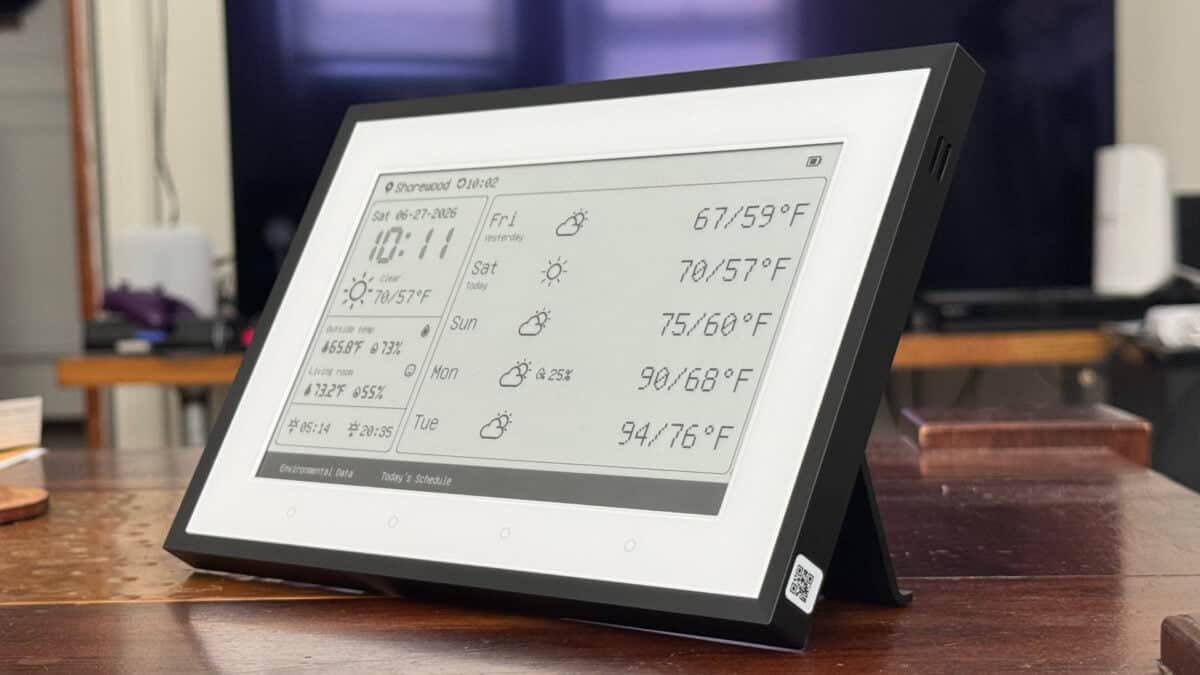
Image: Gizmodo
The $110 SwitchBot Home Dashboard is a 7.5-inch E Ink display built for people who want weather and calendar information visible at a glance. It is lightweight, easy to mount, Matter-compatible, and powered by a 5,000mAh battery that SwitchBot says can last up to a year under the right conditions.
That combination makes it a useful information terminal. But the device’s limited customization—and a surprisingly reflective screen—keep it from being an easy recommendation.
A simple E Ink weather and calendar display
The Home Dashboard resembles a picture frame. Its rear mounting points work with either a two-piece tabletop stand or an adhesive wall-mount strip. A recessed area positions the USB-C port downward, allowing the display to stay plugged in while wall-mounted without sharply bending the cable.
Recommended reading
Facial smart locks finally make sense
© Wes Davis / Gizmodo
A button on top activates the edge lighting, while a rear button starts pairing mode. The front includes four touch-sensitive buttons. The first returns to the weather home screen and cycles through additional views; the second opens a calendar view; the remaining two can trigger SwitchBot devices.
The default weather screen uses three columns for the time and current conditions, detailed data such as barometric pressure and wind speed, and a six-day forecast. Calendar data can be pulled from Google, iCloud, Microsoft, and other services through an ICS link entered in the SwitchBot app. The display supports one- and three-day schedules, as well as weekly and monthly calendar views.
© Wes Davis / Gizmodo
The device can also expose its buttons and built-in temperature and humidity sensors to other platforms through a Matter-compatible SwitchBot hub. However, the buttons are slow: a tap could take up to 10 seconds to produce a response, or about five seconds when tapped repeatedly. That makes the Home Dashboard a poor replacement for a dedicated smart-home switch, though it remains useful for simple tasks such as turning on lights.
SwitchBot’s Hub 3 initially did not support bridging the Home Dashboard over Matter. After testing, the company released an update and said support was rolling out to Home Dashboard owners. Users who do not see it may need to check their hub’s firmware settings or contact SwitchBot support.
The display also includes an alarm with several tones. Its speaker is unexpectedly good for a device of this type, avoiding the harsh, tinny sound common in small gadgets.
The glare is… pretty bad. © Wes Davis / Gizmodo
Customization is the weak point
The SwitchBot app offers basic controls over the display. Users can choose a simpler weather layout with larger forecast information, switch between metric and imperial units, and change the temperature and time displays from their defaults of Celsius and 24-hour time.
Additional views include hourly forecasts and weekly or monthly calendars. The built-in designs are clean, but they offer little room for personalization. The Custom section only lets users enter text for display on the panel.
SwitchBot says the device can import dynamic text, including bus schedules, and connect to external services. In practice, setting those features up is complicated enough that most owners would need development or scripting experience. The Home Dashboard cannot easily produce the varied graphical layouts available on the TRMNL, a competing e-paper display with a plugin marketplace and community-created screens.
© Wes Davis / Gizmodo
© Wes Davis / Gizmodo
© Screenshots by Wes Davis for Gizmodo
The TRMNL’s base model costs $30 more than the SwitchBot, but its customization makes the price difference easier to justify for enthusiasts. The SwitchBot is better suited to people who want a ready-made weather and calendar board without extra configuration.
The hardware has several strengths: long battery life, a front light, multiple mounting options, Matter support, and a clear paper-like display in good lighting. Unfortunately, SwitchBot covered that display with glossy glass, making reflections from nearby windows a serious problem at some viewing angles.
For weather and calendar information, the Home Dashboard works well. At $110, though, its glare-prone screen and restrictive custom view make it difficult to recommend until SwitchBot improves the software and display finish.

Frontier Editor
Dan is our resident futurist, covering electric mobility, space exploration, and the smart home. He's interested in atoms just as much as bits. Whether it's a new battery chemistry, a reusable rocket, or a protocol that finally makes IoT devices talk to each other, Dan breaks down the engineering that pushes humanity forward.
via Gizmodo