• 4 min read
Microsoft’s new Photos app asks Windows users to name faces
Microsoft’s OneDrive Photos quietly appeared on some Windows 11 PCs, adding face grouping while removing editing tools from the original Photos app.
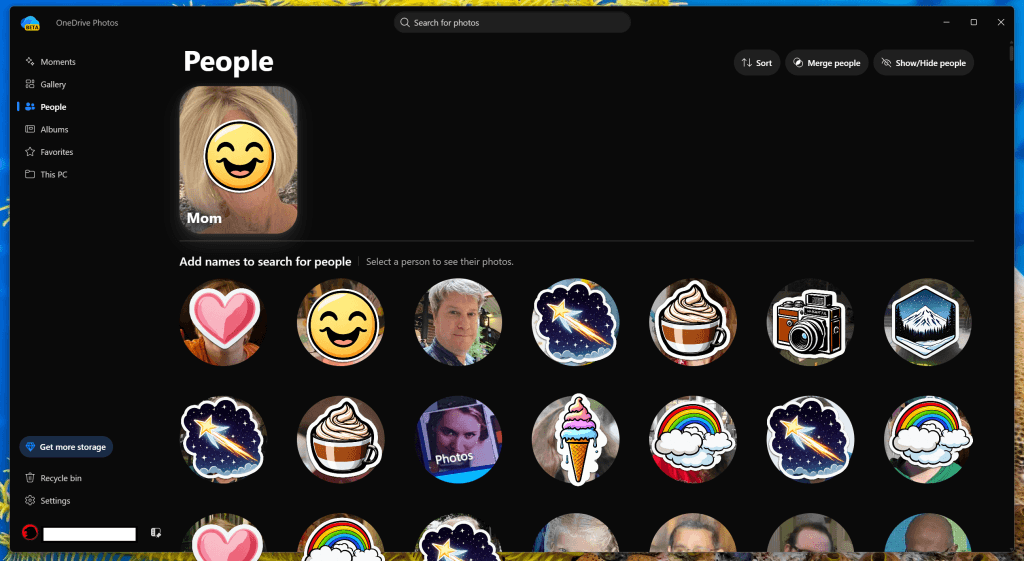
Image: PCWorld
Microsoft has quietly added a second Photos app to some Windows 11 PCs. Called OneDrive Photos (beta), it resembles the existing Windows Photos app but puts a new People section front and center—one that asks users to name the faces found in their images.
Microsoft has not publicly announced the app, and the affected PCs are not enrolled in the Windows Insider program. The app also does not appear to be a Microsoft Store download; it arrived through a OneDrive update and showed up automatically on multiple machines, according to PCWorld.
Microsoft told PCWorld that the new gallery is intended for Windows Insiders in the Experimental channel, creating a mismatch with the installation observed on a non-Insider PC and a work laptop running a non-Preview version.
“OneDrive Photos is already generally available today, and we’re now previewing its new gallery as 'Photos (Preview)' for Windows Insiders in the Experimental channel.”
The company said face grouping is visible only to the account owner and is never shared. Users can opt out, Microsoft does not use the facial scans to train its AI models, and the data is deleted after 30 days. Microsoft said it will collect Insider feedback before a broader rollout. It did not explain why the app had already appeared on non-Insider systems.

Recommended reading
Why lighter batteries can take 10 years to reach market
What OneDrive Photos includes
OneDrive Photos shares much of its interface with the standard Windows Photos app, but its navigation is more limited. The main sections are:
- Moments: Photos taken on the same calendar day in different years.
- Gallery: The user’s photo roll.
- People: Faces identified in photos, screenshots, and other OneDrive content.
- Albums: Themed collections from a specific month.
- Favorites: Photos marked as favorites.
- This PC: A link that appears to lead to a OneDrive folder on the local PC, although its purpose is unclear.
The app retains some of Windows Photos' editing tools, including cropping and AI-assisted object removal, but removes many of the original app’s capabilities. The full Photos app also offers a shortcut to Image Creator, where users can edit or create images with AI; only a subset of those tools remains in OneDrive Photos.
That change makes the new app less useful as a quick photo-editing utility. It also shifts attention toward cataloging and identifying people rather than editing images.
The Moments section shows photos taken on the same date over multiple years.
How the People section works
The People section scans images stored in OneDrive and groups the faces it finds. It can include family members, friends, political figures, sports stars, and people who appear in screenshots or other shared material. The app appears to rank faces by how frequently they occur, placing the most common people first.
Users can attach any name to a face, search for photos containing that person, or leave the face unnamed and use the grouping without adding a label. They can also merge photos when the recognition system fails to associate the same person across different ages—a common problem when comparing baby, child, and teenage photos. Faces can be highlighted or hidden entirely.
The existing Windows Photos app has long supported searches for scenes and objects such as “beach,” “white car,” and “license plate.” OneDrive Photos keeps that capability and displays how many matching images it found. The difference is that it actively asks users to identify the people in those images.
OneDrive Photos' People section groups faces and asks users to assign names.
Microsoft Photos adds identity categories
The standard Windows Photos app does not have a People section, but it now includes an Identity section. It can identify and organize Notes, Receipts, and Screenshots. The Identity section observed by PCWorld was blank, while only a few receipts were detected despite years of stored photos.
Neither Photos nor OneDrive Photos provides a direct link to Personal Vault, OneDrive’s encrypted storage area for sensitive material such as personal information, legal documents, and private photos. The Photos Identity section also does not require the PIN or biometric authentication that Personal Vault uses.
Google Photos offers similar face recognition, with permission, and also asks users to organize photos by person. A Google Photos screen shown by PCWorld appeared to go further by suggesting a family tree based on images of relatives.
Google Photos appears to suggest organizing relatives into a family tree.
Microsoft has not explained what it ultimately wants OneDrive Photos to accomplish, nor when the app will roll out broadly. For now, users can ignore the People section—and, if the app has appeared on their PC, ignore OneDrive Photos itself. The company’s stated privacy controls do not change the fact that the app arrived through a OneDrive update rather than an explicit installation.
Computing Editor
Tomas lives in the terminal. He covers chips, laptops, and operating systems with a focus on performance and efficiency. He reads kernel changelogs the way other people read fiction, and he's always on the hunt for the perfect mechanical keyboard switch. If it processes data, Tomas has an opinion on it.
via PCWorld