• 3 min read
Adobe’s Project Indigo adds AI photo critiques
Adobe’s Project Indigo camera app is testing AI photo critiques, object removal, depth effects, and editing suggestions on iOS.
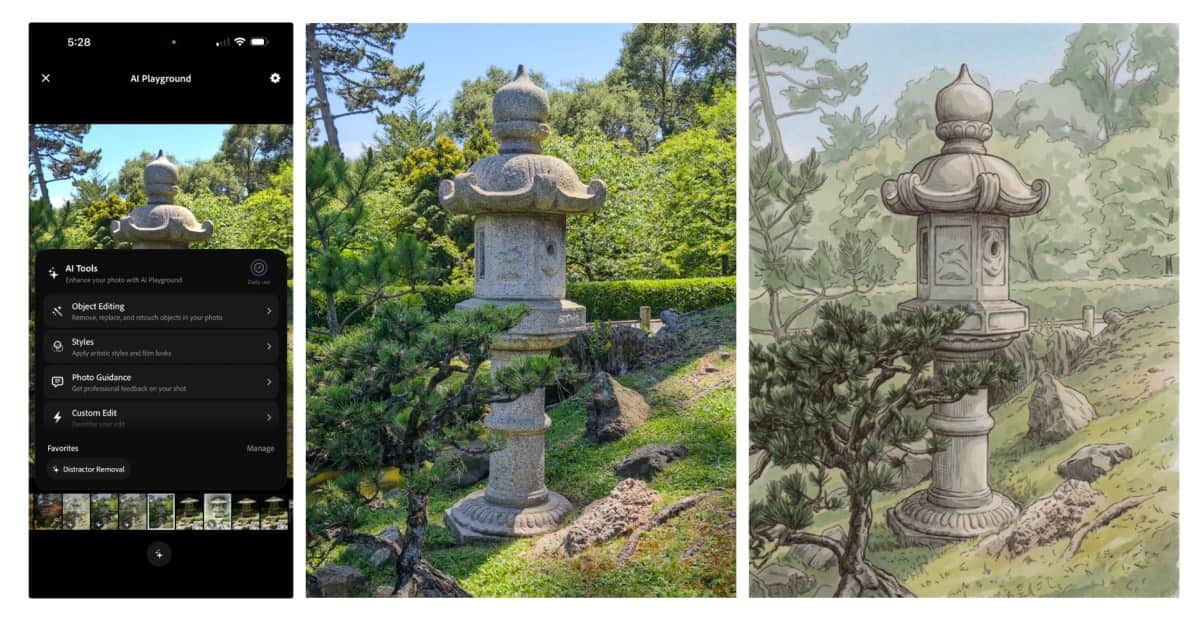
Image: TechCrunch
Adobe is expanding Project Indigo, its experimental iOS camera app, with AI tools that critique photographs, recommend edits, remove objects, generate depth of field, and apply visual styles.
Launched last year, Project Indigo already offered professional camera controls, multi-frame super-resolution, and several capture modes. The new features use large language models (LLMs) to analyze photos and suggest changes, but Adobe is emphasizing buttons and predefined actions rather than relying entirely on text prompts.
Marc Levoy, who leads the project and previously developed Google Pixel’s camera capabilities, said prompt-based editing can make it difficult to find the wording needed to produce the desired result. Project Indigo’s experimental tools are intended to generate more deterministic outputs.
AI photo critiques and editing advice
The app’s photo critique feature provides a “professional” assessment of a picture’s framing, lighting, colors, and emotional impact. A second feature, called capture and edit suggestions, recommends how to reshoot an image by changing its framing, exposure, or objects in the viewfinder.

Recommended reading
Apple releases beta 4 for its OS 27 updates
The suggestions can be specific. In one example, Project Indigo recommended removing a hexagonal white object from the frame. The app also explains how to improve an existing photo using controls from Adobe Lightroom.
The approach is more detailed than Google’s Camera Coach feature for Pixel phones, which launched last year with more general framing advice. Even when users disagree with the assessment, Adobe’s suggestions could help explain some of the practical nuances of photography.
Object removal, depth effects, and styles
Object removal has been available for years in apps such as Apple Photos, Google Photos, and Adobe Photoshop. Those tools often require users to circle or paint over an object, however, and the selection process is not always accurate.
Project Indigo instead offers toggles for common distractions, including:
- People in the background
- Trash and trash cans
- Wires and poles
- Fences
- Vehicles and other clutter
Users can also describe a custom object to remove. In testing, the app removed a friend and the object he was holding from the background without producing obvious artifacts.
The update can also generate a simulated depth of field, blurring the background of an image. Adobe is testing style transfer presets including watercolor, pen and ink, ink line with color wash, monochromatic, and backlit subject. Some recall the early Prisma app, though the feature itself is neither new nor especially useful; newer models simply produce more refined results.
Project Indigo also includes a prompt-based editing option, despite Levoy’s criticism of prompt-driven workflows. It can handle edit sequences not covered by the preset tools, but the flexibility also creates a potential path toward low-quality generated imagery.
Availability and models
The tools are grouped under the app’s AI Playground tab and remain in testing. Only select users will receive access, and Adobe said the features may never reach a wider audience.
For now, the company is using Google’s Gemini-based Nano Banana models, while leaving open the possibility of switching to other models, including its own Adobe Firefly system.

Computing Editor
Tomas lives in the terminal. He covers chips, laptops, and operating systems with a focus on performance and efficiency. He reads kernel changelogs the way other people read fiction, and he's always on the hunt for the perfect mechanical keyboard switch. If it processes data, Tomas has an opinion on it.
via TechCrunch