• 3 min read
CapCut Pad lands on Android tablets with free Pro features
CapCut Pad has finally arrived on Android tablets, bringing a tablet-first editing layout, multi-track timelines, 4K exports at 60 fps with HDR support, and a limited-time window where Pro features are unlocked for free.
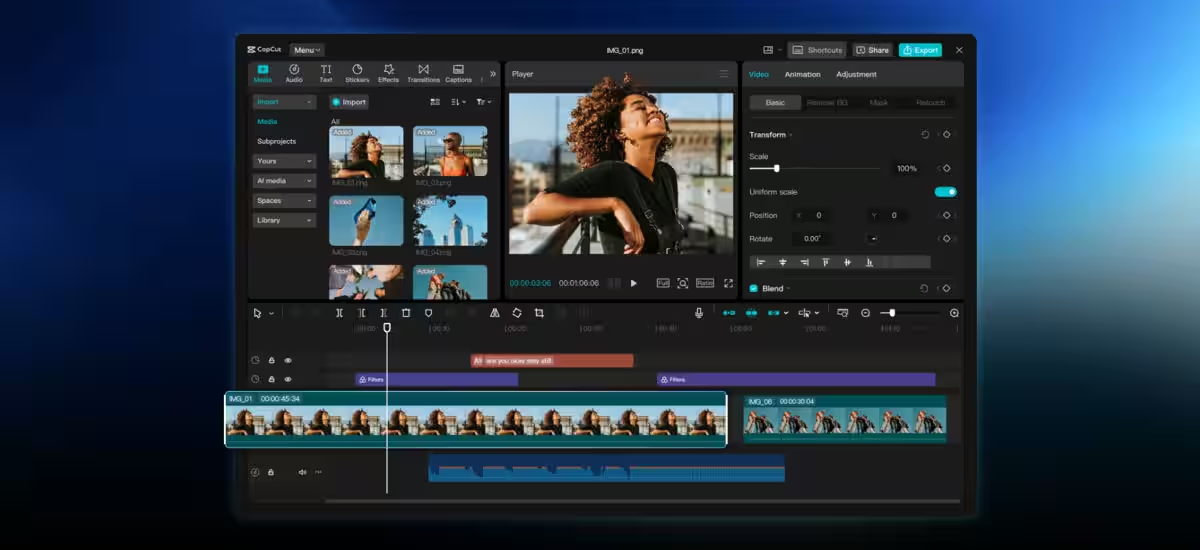
CapCut Pad has finally arrived on Android tablets, bringing a tablet-first editing layout, multi-track timelines, 4K exports at 60 fps with HDR support, and a limited-time window where Pro features are unlocked for free.
That matters because the old Android tablet experience was basically the phone app in a bigger pair of shoes. This version is a full redesign, and it follows the iPad release that launched first in December 2025, where availability was initially limited by region. For creators who bounce between phone and tablet, project sync is the quiet killer feature: start a cut on one device and finish it on another without the usual app chaos.
CapCut Pad features on Android tablets
CapCut Pad includes the tools that keep mobile editors from feeling amateurish: chroma key, keyframe animation, video stabilization, slow motion, background removal, and auto captions. The multi-track timeline gives clips, audio, and effects enough room to breathe, which sounds boring until you’ve tried editing serious video on a cramped phone interface.
- Multi-track timeline for clips, audio, and effects
- Chroma key and keyframe animation
- Video stabilization and slow motion
- AI background removal and auto captions
- Exports up to 4K at 60 fps with HDR support
CapCut Pad pricing and the free launch window
Right now, the app is free to download from Google Play, and CapCut has opened all features at no cost for a limited time. The catch is obvious: this is unlikely to stay that way forever. CapCut’s standard app charges around $10 a month for Pro features, so CapCut Pad is probably headed toward the same paid tier once the launch party ends.
Recommended reading
Samsung may reshape One UI 10 around adaptive AI
That pricing strategy makes sense for ByteDance, which has turned CapCut into one of the default editors for short-form video on TikTok, Instagram Reels, and YouTube Shorts. Free access gets people in the door; recurring subscriptions pay for the privilege later. The real surprise is that tablet support took this long, given how many creators now do quick edits on bigger screens instead of laptops.
Why the Android tablet release matters now
The timing is doing a lot of work here. iPad users got CapCut Pad first, but the Android release finally closes the gap for everyone who edits on larger-screen devices without wanting to drag around a notebook computer. For a crowded mobile editor market, that’s a smart move: make the best version feel temporary, get users hooked, then sort out the monetization later.
If CapCut keeps the tablet app genuinely better than the stretched-out phone version, plenty of creators will stick around after the free period ends. If it doesn’t, people will go back to juggling desktop tools, and ByteDance will have learned the same lesson every app company eventually learns: tablet users can smell a compromise from across the room.

Gadgets Editor
Eli is obsessed with the tangible future. He reviews phones, wearables, and everything with a battery. Known for his rigorous testing protocols and unabashed teardowns, Eli has broken more review units than he cares to admit, all in the name of discovering the truth about durability and repairability.