• 4 min read
Understanding monitor resolutions: WXGA, WUXGA, WQXGA, QWXGA and more explained
Choosing a new computer, laptop, or monitor? Screen size and refresh rate might catch your eye first, but the resolution is what truly defines image clarity, workspace size, and overall comfort when working on documents,
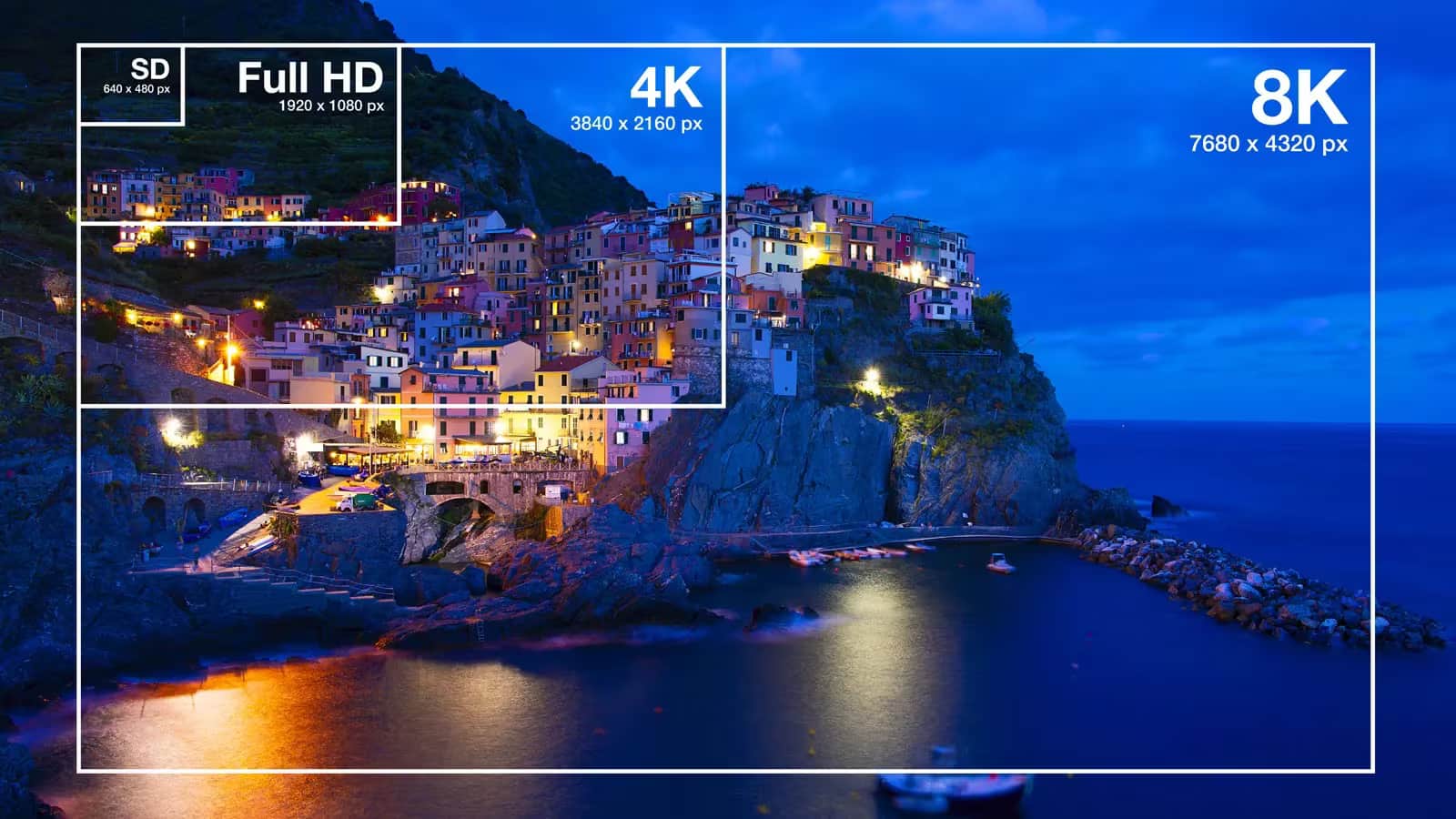
Choosing a new computer, laptop, or monitor? Screen size and refresh rate might catch your eye first, but the resolution is what truly defines image clarity, workspace size, and overall comfort when working on documents, photos, videos, or gaming. The variety of resolution acronyms-WXGA, WUXGA, WQHD, WQXGA, QWXGA-can feel like alphabet soup. Behind each is a distinct display standard with its own quirks, strengths, and use cases.
Today’s panels span from basic HD all the way to professional 5K and even 8K monitors. Some resolutions target office tasks, others cater to designers and engineers, while a few have become gaming industry benchmarks. This first article in our series breaks down the origin of XGA-based naming conventions, clarifies what the letters mean, compares popular standards, and offers advice on picking the right monitor resolution for your needs.
What is screen resolution?
Screen resolution refers to the number of pixels composing the display image. It’s typically given as width × height. For example, 1920×1080 means the screen has 1,920 pixels horizontally and 1,080 vertically. More pixels generally mean finer detail and sharper text, photos, and UI elements.
But a higher pixel count alone doesn’t guarantee better visuals. Pixel density-measured in pixels per inch (PPI)-depends on the screen’s diagonal size. A 24-inch Full HD display looks crisper than a 32-inch panel with the same resolution. Plus, pushing more pixels demands more from your graphics hardware, so gamers often juggle image quality and performance.
The evolution of XGA standards
The roots of these display standards go back to the late 1980s, when IBM introduced VGA at 640×480 pixels-a breakthrough at the time. As technology advanced, higher resolutions appeared:
Recommended reading
Nvidia commits $1 billion to South Korea’s AI buildout
When widescreen displays became popular, manufacturers added a W prefix for “Wide.” Additional letters followed:
- W – Wide (widescreen)
- Q – Quad (four times the original base pixels)
- U – Ultra
- XGA – eXtended Graphics Array
This led to today’s familiar WXGA, WUXGA, WQXGA, and other standards.
WXGA: the budget widescreen workhorse
WXGA isn’t a single fixed resolution but covers several popular variants like 1280×720, 1280×768, 1280×800, and most commonly 1366×768 pixels. These usually sport 16:9 or 16:10 aspect ratios.
This format dominated entry-level laptops and office PCs in the early 2010s. Its biggest selling points were low manufacturing costs and minimal strain on graphics hardware. Even weak integrated graphics chips handle WXGA smoothly. For email, documents, and web browsing, WXGA was often perfectly adequate.
However, WXGA is showing its age. On larger screens, it looks noticeably pixelated, especially when reading fine text or retouching photos. The limited workspace means more scrolling and less information visible at once-an inconvenience for productivity.
WXGA+: a small boost in workspace
WXGA+ offers a bit more breathing room at 1440×900 pixels. It gained traction in mid-range laptops and was seen as a versatile choice for everyday use.
Compared to WXGA, WXGA+ provides more screen real estate for multi-window workflows, document editing, and professional apps. The image is sharper, and UI elements appear cleaner. Despite that, WXGA+ never became mainstream and is gradually eclipsed by Full HD, which packs even more pixels for a similar price. As a result, WXGA+ laptops and monitors have become much rarer.
HD (1280×720): the TV-born resolution
Though not technically part of the XGA family, HD’s 1280×720 resolution often gets lumped in with WXGA due to its widespread use in budget devices. Originally designed as a high-definition TV format, HD marked a huge leap from DVD-era video quality.
Today, many online videos and streams default to 720p HD. Its main advantage is very low hardware demands, letting older computers and laptops play video smoothly. HD panels are also cheaper-but they fall short for desktop productivity. On larger displays, pixels become visible, text loses crispness, and workspace feels tight. Consequently, HD is being steadily replaced by Full HD and WUXGA in modern laptops.
Full HD (1920×1080): the industry workhorse
1920×1080, known as Full HD (FHD), remains the practical gold standard across monitors, laptops, TVs, and gaming setups. Its popularity stems from an ideal balance of sharp image quality and hardware efficiency.
Full HD looks clear on most common screen sizes, and modern GPUs can handle this resolution effortlessly-even in demanding games. Its huge advantage is universality: most software, games, and media target 1080p, making interface scaling issues rare.
Still, Full HD is increasingly seen as a mid-tier option. For photo editing, video production, and complex graphic work, its screen real estate can feel cramped. On displays larger than 30 inches, pixel density drops noticeably compared to smaller screens.
In the next part, we’ll cover more advanced resolutions like WUXGA, QWXGA, WQHD, and WQXGA.
AI Editor
Ava covers the rapidly evolving world of artificial intelligence, from foundational models and research labs to the real-world economics of intelligence. With a background in computational linguistics, she cuts through the hype to find out what actually works. She firmly believes that benchmarks are just marketing until reproduced in the wild.