• 2 min read
Firewally gives Mac apps internet access by permission
Firewally is a free Mac App Store utility that shows per-app network activity in real time and lets you block access with a click.
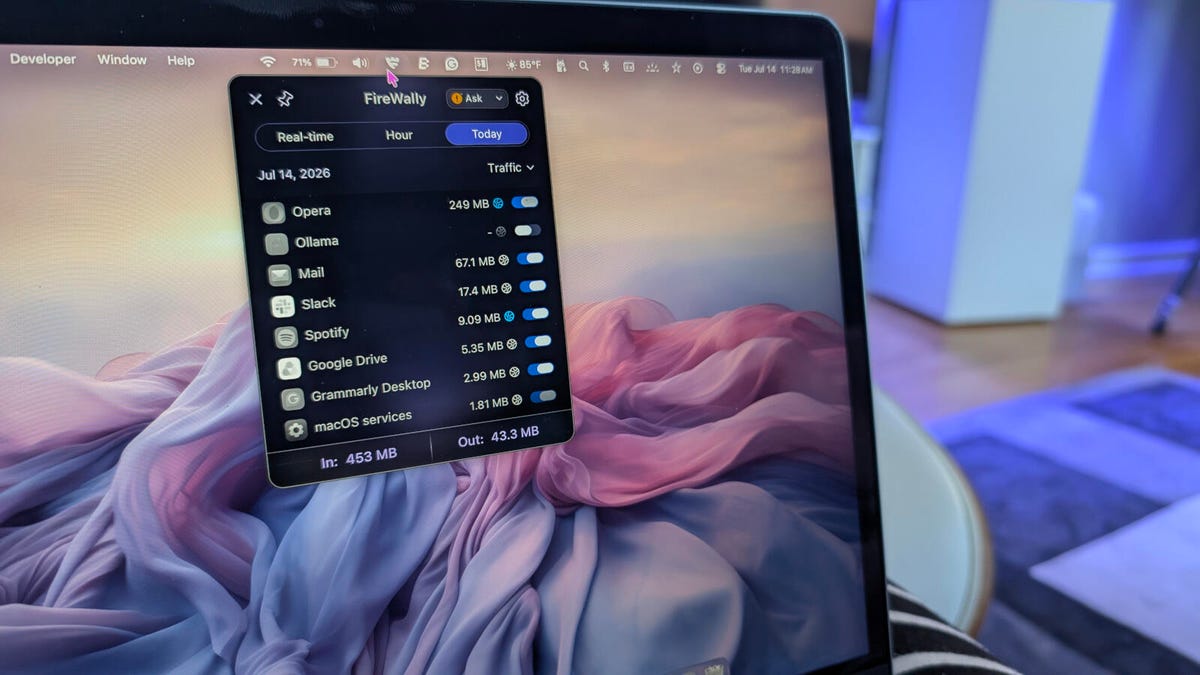
Image: ZDNET
A free MacOS utility called Firewally gives users a simple way to see which apps are reaching the internet and shut that access off quickly. Writing for ZDNET, Jack Wallen says the app has become a useful security tool because it shows real-time traffic by app, lets users set a default firewall policy, and can enable or disable network access for individual apps.
Firewally is available through the Apple App Store and lives in the top menu bar rather than as a traditional standalone app. After installation, users go through an onboarding wizard that asks for network permissions, and Wallen recommends setting it to launch at boot.
One of his main tips is to change the default policy from Pass to Ask. With Ask enabled, new apps must request permission before going online; with Pass, new apps automatically get internet access.

Recommended reading
Hinge founder Justin McLeod readies Overtone AI matchmaker
The app includes a few quick controls:
- View traffic in Hourly, Real Time, and Today tabs
- Check an app summary by hovering over the AI icon
- View live network statistics from the traffic icon
- Toggle an app’s internet access On or Off
- Open settings to disable AI summaries or enable launch at startup
Wallen points to Ollama as an example. He uses the locally installed tool for privacy and says it only needs internet access to download or update LLMs, so he keeps it blocked the rest of the time through Firewally.
He also cautions that cutting off the wrong app can break it — disabling internet access for a web browser, for example, would make it unusable. But for apps that do not need network access, Firewally offers a fast, low-friction way to lock them down.

Computing Editor
Tomas lives in the terminal. He covers chips, laptops, and operating systems with a focus on performance and efficiency. He reads kernel changelogs the way other people read fiction, and he's always on the hunt for the perfect mechanical keyboard switch. If it processes data, Tomas has an opinion on it.
via ZDNET