

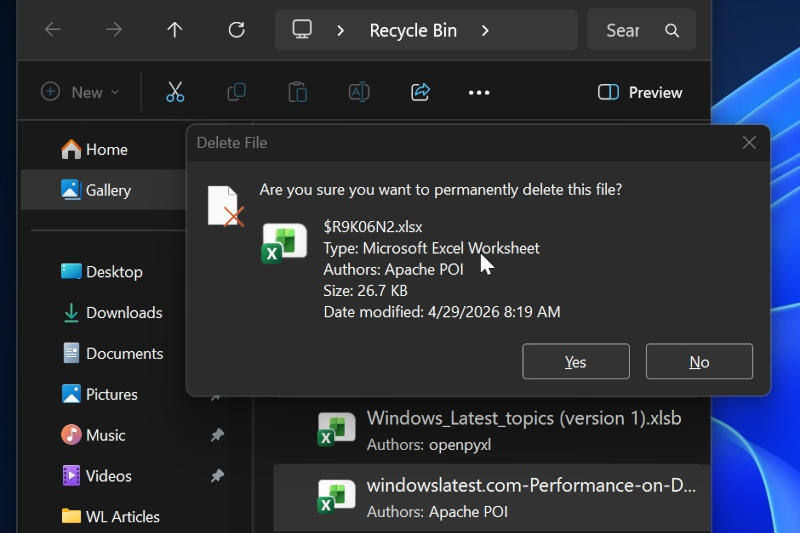
Microsoft has confirmed that its June Windows 11 update, KB5094126, is causing two issues at once: showing the wrong file name in the Recycle Bin delete prompt and breaking Office app launches from some third-party apps. The good news is that neither problem is subtle. The bad news is that both are real, and both are shipping to users.
The filename glitch appears in the Windows 11 June update KB5094126. When Windows Latest tried to permanently delete an Excel file from the Recycle Bin, the confirmation dialog displayed a different name – a system-style file label instead of the original file name. Microsoft says the prompt is wrong, but the file itself is still handled correctly: it keeps its original name in the Recycle Bin and, if restored, returns under that same name.
KB5094126 changes the delete prompt, not the delete itself
That distinction matters because this is more of a cosmetic bug than a data-loss bug. Users are seeing the wrong thing at the worst possible moment, which is excellent timing for a scare and terrible timing for trust. Microsoft says it has identified the root cause and plans to fix it in the next cumulative update; for corporate customers, it is offering a temporary workaround, while home users are being told to wait.
- Affected update: KB5094126
- Symptom: wrong file name in the confirmation dialog for permanent deletion
- Impact: the file still deletes or restores correctly
Office apps can crash when launched from other software
The second bug is more disruptive. Microsoft says KB5094126 also breaks integration between Office and other applications, so launching Word, Excel, or PowerPoint from a third-party app can cause an unexpected crash. Opening those same apps from the Start menu still works normally, which is a helpful reminder that Windows can be wonderfully inconsistent in exactly the ways users do not ask for.
Microsoft has acknowledged that issue too, and says the fix is scheduled for an update due on 14 July 2026. That gives enterprises a short-term headache and everyone else a reason to be suspicious of ”minor” monthly updates, which have a habit of arriving with one job and taking three more.
What Windows 11 users should expect next
For now, the practical advice is simple: if you are on KB5094126 and see the wrong filename in the Recycle Bin, don’t panic, and if Office crashes when launched from another app, use the Start menu instead. The real question is whether Microsoft’s next cumulative patch cleans this up without adding a fresh mess elsewhere – because Windows update season rarely ends with just one bug on the bill.