

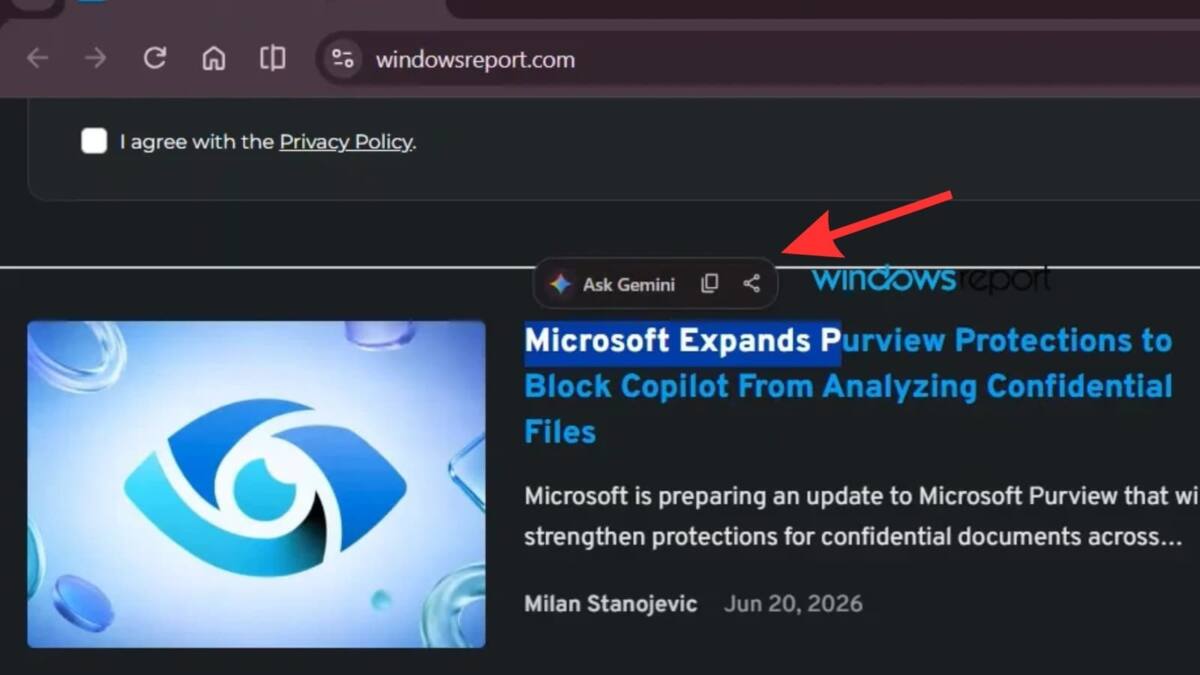
Google is testing a new way to pull Gemini into Chrome: highlight text on a page, and a floating action bar appears with Ask Gemini, Copy, Share, and a more-options menu. The feature is showing up in Chrome Canary, and it pushes Google’s assistant closer to the center of everyday browsing instead of hiding it behind a right-click.
The pitch is simple enough that it almost feels overdue. Select a paragraph, send it straight to Gemini, and use the highlighted text as a ready-made prompt without opening a new tab or copying anything by hand. That is the kind of small workflow shortcut browser makers love, because once people get used to it, the old way suddenly feels annoyingly clunky.
How the Gemini selection panel works
The popup looks a lot like Android’s contextual menus: the selected text sits at the center of the action, and the available commands are immediate rather than buried. Ask Gemini is the headline move, but Copy and Share are there too, which helps Google avoid making the feature feel like an AI gimmick with no everyday utility.
- Ask Gemini sends the selected text to Gemini’s side panel as a prompt.
- Copy duplicates the selection the old-fashioned way.
- Share opens the usual sharing flow.
- More options includes disabling the panel for a site and opening Chrome settings.
Google keeps pushing Gemini deeper into Chrome
This is not a one-off experiment. Google has already been threading Gemini through Chrome with the @gemini address command and a test ”AI Mode” button in the toolbar, so the new selection panel fits a wider strategy: make the browser itself the default entry point to Google’s AI. Microsoft has been doing a version of the same thing with Copilot in Edge, and the competitive logic is obvious – whoever owns the browser UI gets the first shot at the prompt.
There is also a practical reason for Google to keep shaving steps off the process. Ask Gemini already exists in the right-click menu, but putting it directly above selected text makes the feature harder to miss and easier to use on impulse. The unfinished-looking settings area reported by Windows Report suggests this is still early work, which is exactly when browser experiments tend to be a little messy and a lot revealing.
What could change before launch
If Google ships this, expect the real argument to be about control, not capability. Users get a faster path to summaries and follow-up questions; publishers and site owners get another Google-owned layer sitting between the reader and the page. The open question is whether people will treat the panel as a useful shortcut or just one more button they ignore after the novelty wears off.