

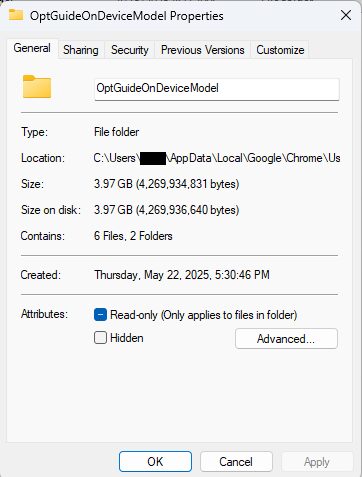
Google Chrome has been slipping a 4GB Gemini Nano AI model onto some users’ devices without asking first, and then quietly reinstalling it if they remove it. The file appears in Chrome profiles as ”weights.bin” inside an ”OptGuideOnDeviceModel” folder once the browser decides a device qualifies.
The awkward part is that this is framed as privacy-friendly AI, yet Chrome’s most visible AI option, the ”AI Mode” pill in the address bar, still sends queries to Google’s cloud servers. So users get the storage hit, the bandwidth hit, and maybe the privacy pitch, but not necessarily the local processing that would make the download feel justified.
What Chrome is downloading
The Gemini Nano model powers features such as ”Help me write”, on-device scam detection, and a Summarizer API that websites can tap directly. Google has enabled some of those features by default in recent Chrome versions, which makes the whole thing even more slippery: people can end up with a large AI payload before they’ve ever opted in.
For users on fixed wireless, mobile hotspots, or simply tight data plans, 4GB is not some abstract cloud number. It is a serious transfer, especially in markets where bandwidth still costs real money. A silent download at that size is the kind of thing that makes ”the browser did it” sound less like a feature and more like a tax.
How to check for Gemini Nano on Windows and Mac
On Windows, open File Explorer, paste ”%LOCALAPPDATA%\\Google\\Chrome\\User Data” into the address bar, and look for ”OptGuideOnDeviceModel”. On a Mac, open Finder, choose Go > Go to Folder, then paste ”~/Library/Application Support/Google/Chrome/” and check for the same folder.
The folder’s presence does not mean malware, and it does not mean your machine is compromised. It does mean Chrome has likely downloaded the model, whether you asked for it or not.
Turning off Chrome’s AI features
The simplest path is to disable the features inside Chrome rather than poking around in the Windows registry. Open Chrome, type ”chrome://settings/ai” into the address bar, and switch off items such as ”Help me write”, AI summaries, and on-device AI features. Then restart the browser.
That may stop Chrome from using or redownloading the model, although some users say the files come back after browser updates. If the settings page does not load, your region, account type, or Chrome version may not support it yet. The one thing Google does not seem to have solved is the old-fashioned problem of asking before it occupies your disk.
The broader pattern is bigger than Chrome. Browsers and desktop apps are increasingly treating local machines like deployment targets for AI components, and the user only finds out after the fact. Expect regulators to take a harder look at that behavior – especially when the software insists on reinstalling itself like a very determined house guest.