

Color and HDR features
Skyworth is pitching this as more than a twitchy gaming display. The G27Q Pro covers 97% of DCI-P3, 100% of sRGB, and 94% of Adobe RGB, and each unit is factory-calibrated to a Delta E of less than 1. That won’t turn it into a studio monitor, but it does make the usual ”good for gaming and light creative work” pitch a little more believable than most.
Brightness peaks at 570 nits, with a 1400:1 static contrast ratio and HDR400 certification. It also includes Rec.709 and BT.2020 profiles, plus lower-key extras such as an ambient light sensor, hardware-level low blue light reduction, an anti-glare matte coating, and DC dimming to cut flicker.
Ports, stand, and day-to-day extras
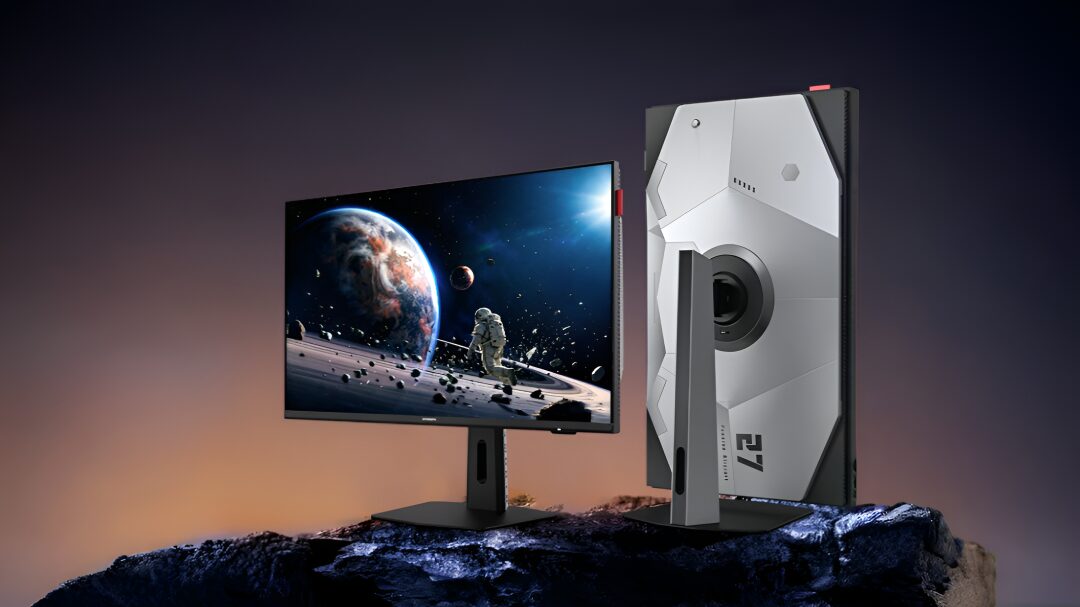
On the gaming side, Skyworth has bundled genre presets for FPS, RPG, and MOBA titles, along with crosshairs, shadow boosting, sniper zoom modes, and a virtual 24.5-inch mode for players who prefer a tighter field of view. The monitor’s stand offers 130mm of height adjustment, tilt, swivel, and a 90-degree pivot, while VESA 75x75mm mounting is also supported.
The G27Q Pro weighs 4.9kg with the stand. If you want the full 1440p at 275Hz experience, DisplayPort is the route to take; the HDMI 2.0 ports will not push the same bandwidth, which is the sort of inconvenient reality monitor makers rarely lead with in their marketing.
The bigger question is whether buyers will choose this kind of all-rounder over newer OLED and mini-LED rivals that are starting to flood the premium end of the market. For now, Skyworth’s pitch is simple: plenty of speed, proper resolution, and a price that makes the spec sheet look a lot more expensive than it is.
Color and HDR features
Skyworth is pitching this as more than a twitchy gaming display. The G27Q Pro covers 97% of DCI-P3, 100% of sRGB, and 94% of Adobe RGB, and each unit is factory-calibrated to a Delta E of less than 1. That won’t turn it into a studio monitor, but it does make the usual ”good for gaming and light creative work” pitch a little more believable than most.
Brightness peaks at 570 nits, with a 1400:1 static contrast ratio and HDR400 certification. It also includes Rec.709 and BT.2020 profiles, plus lower-key extras such as an ambient light sensor, hardware-level low blue light reduction, an anti-glare matte coating, and DC dimming to cut flicker.
Ports, stand, and day-to-day extras
On the gaming side, Skyworth has bundled genre presets for FPS, RPG, and MOBA titles, along with crosshairs, shadow boosting, sniper zoom modes, and a virtual 24.5-inch mode for players who prefer a tighter field of view. The monitor’s stand offers 130mm of height adjustment, tilt, swivel, and a 90-degree pivot, while VESA 75x75mm mounting is also supported.
The G27Q Pro weighs 4.9kg with the stand. If you want the full 1440p at 275Hz experience, DisplayPort is the route to take; the HDMI 2.0 ports will not push the same bandwidth, which is the sort of inconvenient reality monitor makers rarely lead with in their marketing.
The bigger question is whether buyers will choose this kind of all-rounder over newer OLED and mini-LED rivals that are starting to flood the premium end of the market. For now, Skyworth’s pitch is simple: plenty of speed, proper resolution, and a price that makes the spec sheet look a lot more expensive than it is.
Color and HDR features
Skyworth is pitching this as more than a twitchy gaming display. The G27Q Pro covers 97% of DCI-P3, 100% of sRGB, and 94% of Adobe RGB, and each unit is factory-calibrated to a Delta E of less than 1. That won’t turn it into a studio monitor, but it does make the usual ”good for gaming and light creative work” pitch a little more believable than most.
Brightness peaks at 570 nits, with a 1400:1 static contrast ratio and HDR400 certification. It also includes Rec.709 and BT.2020 profiles, plus lower-key extras such as an ambient light sensor, hardware-level low blue light reduction, an anti-glare matte coating, and DC dimming to cut flicker.
Ports, stand, and day-to-day extras
On the gaming side, Skyworth has bundled genre presets for FPS, RPG, and MOBA titles, along with crosshairs, shadow boosting, sniper zoom modes, and a virtual 24.5-inch mode for players who prefer a tighter field of view. The monitor’s stand offers 130mm of height adjustment, tilt, swivel, and a 90-degree pivot, while VESA 75x75mm mounting is also supported.
The G27Q Pro weighs 4.9kg with the stand. If you want the full 1440p at 275Hz experience, DisplayPort is the route to take; the HDMI 2.0 ports will not push the same bandwidth, which is the sort of inconvenient reality monitor makers rarely lead with in their marketing.
The bigger question is whether buyers will choose this kind of all-rounder over newer OLED and mini-LED rivals that are starting to flood the premium end of the market. For now, Skyworth’s pitch is simple: plenty of speed, proper resolution, and a price that makes the spec sheet look a lot more expensive than it is.
Color and HDR features
Skyworth is pitching this as more than a twitchy gaming display. The G27Q Pro covers 97% of DCI-P3, 100% of sRGB, and 94% of Adobe RGB, and each unit is factory-calibrated to a Delta E of less than 1. That won’t turn it into a studio monitor, but it does make the usual ”good for gaming and light creative work” pitch a little more believable than most.
Brightness peaks at 570 nits, with a 1400:1 static contrast ratio and HDR400 certification. It also includes Rec.709 and BT.2020 profiles, plus lower-key extras such as an ambient light sensor, hardware-level low blue light reduction, an anti-glare matte coating, and DC dimming to cut flicker.
Ports, stand, and day-to-day extras
On the gaming side, Skyworth has bundled genre presets for FPS, RPG, and MOBA titles, along with crosshairs, shadow boosting, sniper zoom modes, and a virtual 24.5-inch mode for players who prefer a tighter field of view. The monitor’s stand offers 130mm of height adjustment, tilt, swivel, and a 90-degree pivot, while VESA 75x75mm mounting is also supported.
The G27Q Pro weighs 4.9kg with the stand. If you want the full 1440p at 275Hz experience, DisplayPort is the route to take; the HDMI 2.0 ports will not push the same bandwidth, which is the sort of inconvenient reality monitor makers rarely lead with in their marketing.
The bigger question is whether buyers will choose this kind of all-rounder over newer OLED and mini-LED rivals that are starting to flood the premium end of the market. For now, Skyworth’s pitch is simple: plenty of speed, proper resolution, and a price that makes the spec sheet look a lot more expensive than it is.
Color and HDR features
Skyworth is pitching this as more than a twitchy gaming display. The G27Q Pro covers 97% of DCI-P3, 100% of sRGB, and 94% of Adobe RGB, and each unit is factory-calibrated to a Delta E of less than 1. That won’t turn it into a studio monitor, but it does make the usual ”good for gaming and light creative work” pitch a little more believable than most.
Brightness peaks at 570 nits, with a 1400:1 static contrast ratio and HDR400 certification. It also includes Rec.709 and BT.2020 profiles, plus lower-key extras such as an ambient light sensor, hardware-level low blue light reduction, an anti-glare matte coating, and DC dimming to cut flicker.
Ports, stand, and day-to-day extras
On the gaming side, Skyworth has bundled genre presets for FPS, RPG, and MOBA titles, along with crosshairs, shadow boosting, sniper zoom modes, and a virtual 24.5-inch mode for players who prefer a tighter field of view. The monitor’s stand offers 130mm of height adjustment, tilt, swivel, and a 90-degree pivot, while VESA 75x75mm mounting is also supported.
The G27Q Pro weighs 4.9kg with the stand. If you want the full 1440p at 275Hz experience, DisplayPort is the route to take; the HDMI 2.0 ports will not push the same bandwidth, which is the sort of inconvenient reality monitor makers rarely lead with in their marketing.
The bigger question is whether buyers will choose this kind of all-rounder over newer OLED and mini-LED rivals that are starting to flood the premium end of the market. For now, Skyworth’s pitch is simple: plenty of speed, proper resolution, and a price that makes the spec sheet look a lot more expensive than it is.
Color and HDR features
Skyworth is pitching this as more than a twitchy gaming display. The G27Q Pro covers 97% of DCI-P3, 100% of sRGB, and 94% of Adobe RGB, and each unit is factory-calibrated to a Delta E of less than 1. That won’t turn it into a studio monitor, but it does make the usual ”good for gaming and light creative work” pitch a little more believable than most.
Brightness peaks at 570 nits, with a 1400:1 static contrast ratio and HDR400 certification. It also includes Rec.709 and BT.2020 profiles, plus lower-key extras such as an ambient light sensor, hardware-level low blue light reduction, an anti-glare matte coating, and DC dimming to cut flicker.
Ports, stand, and day-to-day extras
On the gaming side, Skyworth has bundled genre presets for FPS, RPG, and MOBA titles, along with crosshairs, shadow boosting, sniper zoom modes, and a virtual 24.5-inch mode for players who prefer a tighter field of view. The monitor’s stand offers 130mm of height adjustment, tilt, swivel, and a 90-degree pivot, while VESA 75x75mm mounting is also supported.
The G27Q Pro weighs 4.9kg with the stand. If you want the full 1440p at 275Hz experience, DisplayPort is the route to take; the HDMI 2.0 ports will not push the same bandwidth, which is the sort of inconvenient reality monitor makers rarely lead with in their marketing.
The bigger question is whether buyers will choose this kind of all-rounder over newer OLED and mini-LED rivals that are starting to flood the premium end of the market. For now, Skyworth’s pitch is simple: plenty of speed, proper resolution, and a price that makes the spec sheet look a lot more expensive than it is.
- 27-inch 2K Fast IPS panel, 2560×1440 resolution
- Native 260Hz refresh rate, overclockable to 275Hz
- 1ms gray-to-gray response time
- Adaptive-Sync, AMD FreeSync, and Nvidia G-Sync support
- 2x DisplayPort 1.4, 2x HDMI 2.0, 3.5mm headphone jack
Color and HDR features
Skyworth is pitching this as more than a twitchy gaming display. The G27Q Pro covers 97% of DCI-P3, 100% of sRGB, and 94% of Adobe RGB, and each unit is factory-calibrated to a Delta E of less than 1. That won’t turn it into a studio monitor, but it does make the usual ”good for gaming and light creative work” pitch a little more believable than most.
Brightness peaks at 570 nits, with a 1400:1 static contrast ratio and HDR400 certification. It also includes Rec.709 and BT.2020 profiles, plus lower-key extras such as an ambient light sensor, hardware-level low blue light reduction, an anti-glare matte coating, and DC dimming to cut flicker.
Ports, stand, and day-to-day extras
On the gaming side, Skyworth has bundled genre presets for FPS, RPG, and MOBA titles, along with crosshairs, shadow boosting, sniper zoom modes, and a virtual 24.5-inch mode for players who prefer a tighter field of view. The monitor’s stand offers 130mm of height adjustment, tilt, swivel, and a 90-degree pivot, while VESA 75x75mm mounting is also supported.
The G27Q Pro weighs 4.9kg with the stand. If you want the full 1440p at 275Hz experience, DisplayPort is the route to take; the HDMI 2.0 ports will not push the same bandwidth, which is the sort of inconvenient reality monitor makers rarely lead with in their marketing.
The bigger question is whether buyers will choose this kind of all-rounder over newer OLED and mini-LED rivals that are starting to flood the premium end of the market. For now, Skyworth’s pitch is simple: plenty of speed, proper resolution, and a price that makes the spec sheet look a lot more expensive than it is.
Skyworth has launched the G27Q Pro, a 27-inch gaming monitor that tries to hit the sweet spot between high-resolution visuals and esports-grade speed. This Skyworth G27Q Pro 275Hz monitor pairs a 2560×1440 Fast IPS panel with a native 260Hz refresh rate that can be overclocked to 275Hz, and pre-sales in China start on June 8 at an introductory price of 1,099 yuan, about $162.
That price puts it in the noisy middle of the gaming monitor market, where brands are racing to pack ever-higher refresh rates into more sensible sizes. Asus, for example, has already shown off a 24.5-inch 540Hz OLED model for competitive players, so Skyworth is clearly aiming at a broader crowd: gamers who want speed, but not at the cost of living with a tiny screen.
Skyworth G27Q Pro specifications
The panel is rated for a 1ms gray-to-gray response time and 178-degree viewing angles, with Adaptive-Sync support for both AMD FreeSync and Nvidia G-Sync. Skyworth also includes Motion Clarity Engine Pro and a 10-level overdrive setting, which is the company’s way of saying it expects buyers to care about tuning as much as bragging rights.
- 27-inch 2K Fast IPS panel, 2560×1440 resolution
- Native 260Hz refresh rate, overclockable to 275Hz
- 1ms gray-to-gray response time
- Adaptive-Sync, AMD FreeSync, and Nvidia G-Sync support
- 2x DisplayPort 1.4, 2x HDMI 2.0, 3.5mm headphone jack
Color and HDR features
Skyworth is pitching this as more than a twitchy gaming display. The G27Q Pro covers 97% of DCI-P3, 100% of sRGB, and 94% of Adobe RGB, and each unit is factory-calibrated to a Delta E of less than 1. That won’t turn it into a studio monitor, but it does make the usual ”good for gaming and light creative work” pitch a little more believable than most.
Brightness peaks at 570 nits, with a 1400:1 static contrast ratio and HDR400 certification. It also includes Rec.709 and BT.2020 profiles, plus lower-key extras such as an ambient light sensor, hardware-level low blue light reduction, an anti-glare matte coating, and DC dimming to cut flicker.
Ports, stand, and day-to-day extras
On the gaming side, Skyworth has bundled genre presets for FPS, RPG, and MOBA titles, along with crosshairs, shadow boosting, sniper zoom modes, and a virtual 24.5-inch mode for players who prefer a tighter field of view. The monitor’s stand offers 130mm of height adjustment, tilt, swivel, and a 90-degree pivot, while VESA 75x75mm mounting is also supported.
The G27Q Pro weighs 4.9kg with the stand. If you want the full 1440p at 275Hz experience, DisplayPort is the route to take; the HDMI 2.0 ports will not push the same bandwidth, which is the sort of inconvenient reality monitor makers rarely lead with in their marketing.
The bigger question is whether buyers will choose this kind of all-rounder over newer OLED and mini-LED rivals that are starting to flood the premium end of the market. For now, Skyworth’s pitch is simple: plenty of speed, proper resolution, and a price that makes the spec sheet look a lot more expensive than it is.