

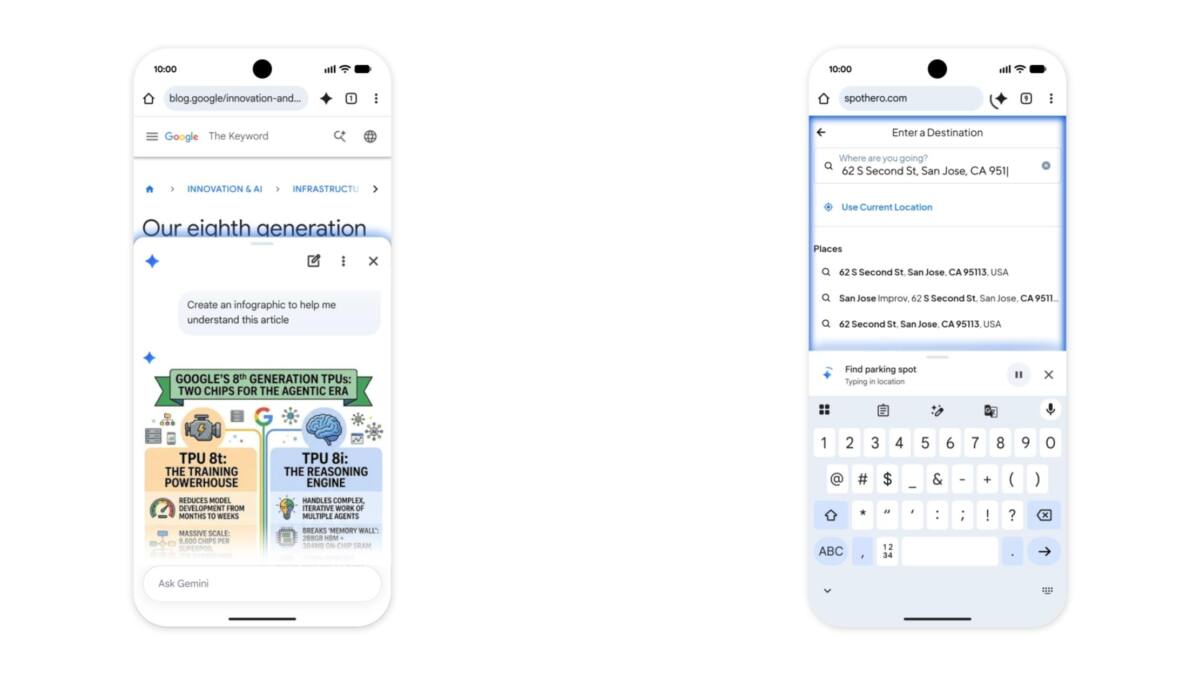
Chrome for Android is getting the full Gemini treatment, and that means more than a smarter sidebar. Google is folding the assistant directly into the browser, adding page summaries, explanations, Calendar and Keep actions, Gmail lookups, and a new auto browse mode that can scroll, tap, and type on your behalf. If this sounds a lot like the desktop rollout from January, that is the point: Google wants Chrome to behave less like a browser and more like a task runner with a web page attached.
The timing is interesting because mobile browsers have quietly become one of the most competitive AI battlegrounds. Microsoft has been pushing Copilot into Edge, while Apple has taken a more cautious route on iPhone and iPad. Google, unsurprisingly, is going harder and faster, using Chrome’s huge Android install base as a distribution engine for Gemini.
Gemini gets a real seat in Chrome
On Android, Gemini is moving from a light-touch overlay to a browser-native experience. A Gemini button will sit beside the address bar and open a bottom sheet that lives inside Chrome itself, letting you ask about the current page, summarize it, or request an explanation without bouncing out to another app.
Google is also wiring in some of its broader AI ecosystem. That includes adding events to Google Calendar, dropping recipe ingredients into Keep, and pulling information from Gmail. The company is even bringing Nano Banana into the mix for infographics and visualizations, which is exactly the sort of thing AI demos love because it looks impressive right up until someone asks for accuracy.
Auto browse is the more ambitious part
The bigger shift is auto browse. This is the mode where Gemini can interact with a site for you, using Chrome the way a person would: scrolling, tapping, and entering text until the task is done. Google’s examples are deliberately mundane – finding parking through SpotHero from ticket details, or updating a Chewy order from puppy food to dog food – because that is where agentic AI is easiest to sell.
It is also the feature that will make privacy and confirmation prompts matter most. Google says users will still have to manually confirm purchases, social posts, and other sensitive actions, which is the right call. Nobody wants an overconfident browser agent freelancing with their credit card.
- Summarize and explain the current page
- Add Calendar events and Keep notes
- Search Gmail for relevant details
- Use auto browse to scroll, tap, and type across sites
Who gets Gemini in Chrome on Android, and when
Gemini in Chrome is rolling out to select devices with at least 4 GB of RAM running Android 12 or higher in the US starting at the end of June. Auto browse is narrower still: it will be available for Google AI Pro and AI Ultra subscribers on select devices. That split tells you where Google sees the business upside – the basic assistant layer helps normalize the feature, while the agentic stuff becomes a paid perk.
The move also nudges Chrome further away from being a simple browser and closer to being Google’s front door for AI. The open question is how often users will trust an assistant to handle tasks inside a tab versus just asking Gemini directly. My bet: summaries and page Q&A get used immediately, while auto browse has to earn its keep one awkward checkout at a time.