

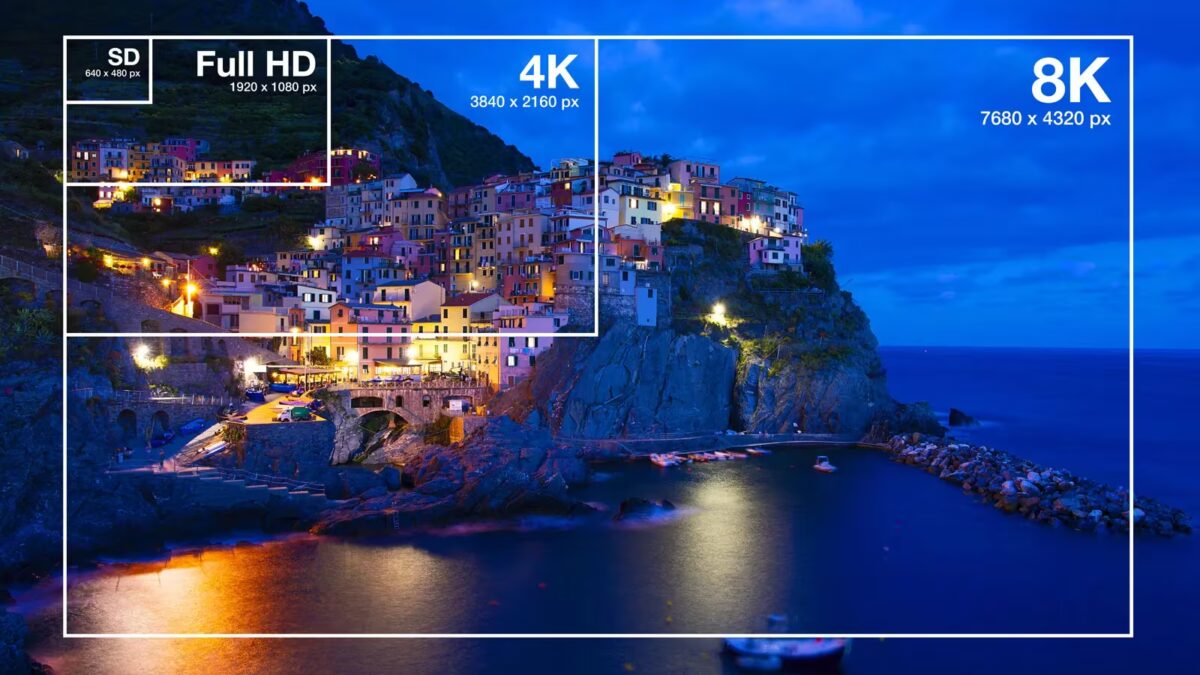
Display technology keeps pushing boundaries, and higher monitor resolutions are at the forefront of that evolution. Today’s top-end monitors go well beyond 4K, targeting professionals in design, engineering, and video editing with ultra-sharp images and massive screen real estate. In this final installment, we break down standards like WQUXGA, 4K UHD, 5K, and 8K, exploring their strengths, weaknesses, and ideal use cases.
WQUXGA resolution explained
WQUXGA, or Wide Quad Ultra Extended Graphics Array, delivers a striking 3840×2400 pixels at a 16:10 aspect ratio. This professional-grade resolution packs more pixels than standard 4K UHD, offering unparalleled detail that caters to high-resolution photo editing, 3D modeling, CAD, and video post-production.
Typically found on premium laptops and workstation displays, WQUXGA screens provide ample workspace for complex software like Adobe Photoshop, Illustrator, AutoCAD, and DaVinci Resolve. The surplus pixels absorb multiple tool palettes and panels without sacrificing the size of the main project window.
The key benefits are crisp image clarity, an expansive workspace, and future-proofing for several years. Even tiny interface elements look razor-sharp, and photos or video footage come across almost pixel-free. However, these advantages come at a price – both literally and figuratively. Devices with WQUXGA displays are costly and demand powerful graphics hardware, with some legacy apps struggling to handle the interface scaling properly.
4K UHD: Mainstream high-resolution standard
At 3840×2160 pixels, 4K UHD (Ultra High Definition) is now the go-to resolution for upscale monitors, TVs, laptops, and gaming consoles worldwide. It quadruples the pixel count of Full HD (1920×1080), making images far more detailed, especially noticeable on larger screens when watching movies, editing photos, or gaming.
4K’s rise is fueled by the flood of Ultra HD content, with many modern cameras and smartphones recording videos in this format and streaming platforms expanding their 4K libraries. The resolution strikes a versatile balance, working well for entertainment, creative work, and gaming alike.
That said, 4K comes with some catches. To fully enjoy its benefits, especially in gaming, you’ll need a powerful GPU. Also, quality 4K monitors remain pricier than Full HD or WQHD models, though prices have been gradually dropping.
5K resolution for professionals and creatives
5K screens push resolution to 5120×2880 pixels, primarily appealing to professionals in design studios, video editing suites, and photography. The extra pixels create a vast workspace, letting users edit 4K video at full resolution while displaying timelines, toolbars, and other windows simultaneously – no scaling required.
The pixel density is so high that even large monitors appear seamless, with no visible dots to the naked eye. This leads to natural, smooth visuals and superior detail. 5K also guarantees longevity as software and content increasingly embrace ultra-high resolutions.
On the downside, 5K monitors are still a niche choice – expensive and demanding top-tier hardware. Many common apps and games may not utilize the full resolution effectively, making 5K overkill for most casual users.
8K resolution: The cutting edge of display technology
8K steps up to an eye-watering 7680×4320 pixels, totaling over 33 million pixels – four times 4K UHD and sixteen times Full HD. This is the pinnacle of sharpness currently available in consumer displays, delivering breathtaking detail, especially on very large screens.
Right now, 8K remains mostly a professional domain, used in filmmaking, advanced computer graphics, scientific visualization, and specialized engineering projects. For home use, it’s largely a tech showcase rather than a practical choice due to scant 8K content, sky-high prices, and enormous hardware demands.
The resolution’s standout perks are unparalleled detail, long-term relevance, and the capacity to work with ultra-HD content at native fidelity. Yet the hurdles include limited native content, scarce compatible hardware, and the cost barrier for consumers and professionals alike.
Choosing the right monitor resolution for your needs
Picking a monitor resolution depends on how you use your computer. If your workflows are mostly web browsing, document editing, and office tasks, entry-level options like Full HD or WUXGA offer solid performance with a good price-performance balance.
For software developers, analysts, or anyone working with large amounts of text, vertical pixel count matters. WUXGA and WQXGA provide more vertical space, enhancing productivity by displaying more lines of code or data without scrolling.
Gamers tend to favor WQHD, widely regarded as the sweet spot between image quality and system performance. If your rig packs a beefy graphics card, stepping up to 4K becomes an attractive option for extra clarity.
Creative professionals dealing with photo editing, video production, and graphic design benefit from the expansive work areas and fine detail of WQXGA, WQUXGA, 4K, or 5K screens, pushing the limits of both software and hardware capabilities.
Comparison table of popular monitor resolutions
| Standard | Resolution | Aspect Ratio | Main Use |
|---|---|---|---|
| WXGA | 1366×768 | 16:9 | Budget laptops |
| WXGA+ | 1440×900 | 16:10 | Office work |
| HD | 1280×720 | 16:9 | Video and entry devices |
| Full HD | 1920×1080 | 16:9 | General use |
| WUXGA | 1920×1200 | 16:10 | Work and business |
| QWXGA | 2048×1152 | 16:9 | Multimedia |
| WQHD | 2560×1440 | 16:9 | Gaming and graphics |
| WQXGA | 2560×1600 | 16:10 | Professional work |
| WQUXGA | 3840×2400 | 16:10 | Design and imaging |
| 4K UHD | 3840×2160 | 16:9 | Gaming, film, video editing |
| 5K | 5120×2880 | 16:9 | Professional studios |
| 8K | 7680×4320 | 16:9 | Specialized tasks |
Final thoughts on monitor resolutions
Screen technology has evolved dramatically, from humble VGA days to today’s staggering 8K panels. Each new resolution level sharpens images, expands workspace, and opens fresh possibilities for users.
For most users, Full HD, WUXGA, and WQHD remain the most practical and cost-effective choices, providing excellent versatility without demanding extreme hardware. Higher-end standards like WQXGA, WQUXGA, 4K, and 5K primarily serve professionals and enthusiasts focused on image precision and ample screen real estate.
When choosing a monitor, don’t just chase pixel counts. Consider your display size, computer’s graphics power, and specific tasks you want to tackle. Striking the right balance ensures your monitor feels natural and efficient every day.