

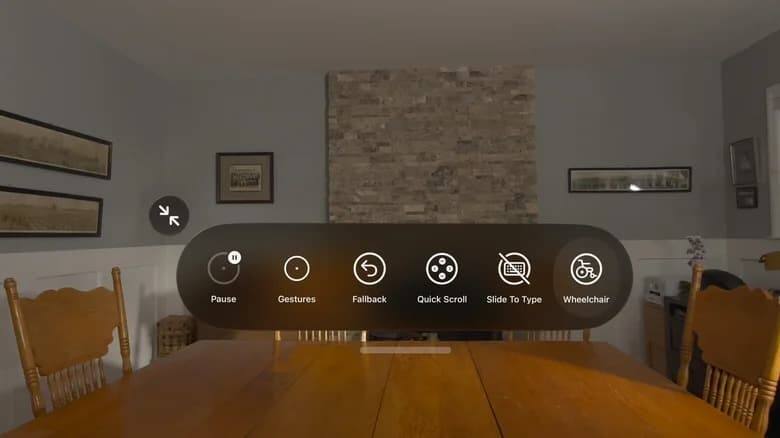
Apple is using its latest accessibility push to turn Vision Pro into a control layer for motorized wheelchairs, while also expanding on-device AI features for blind, low-vision, and deaf users across its software lineup. The company timed the announcement ahead of Global Accessibility Awareness Day on 21 May, and it is leaning hard on Apple Intelligence to make the pitch sound less like a feature dump and more like a shift in how its devices are used.
The headline feature is a new way to steer compatible powered wheelchairs through Vision Pro’s eye-tracking system. That is a neat bit of engineering, but the real story is broader: Apple is trying to make mixed reality, phones, and tablets feel less like separate products and more like an accessibility stack. Rival platforms have had years to build assistive tools, but Apple’s advantage has usually been tighter hardware-software integration, and that is exactly what this update plays to.
Vision Pro can now steer compatible wheelchairs
Apple says the Vision Pro feature uses high-precision gaze tracking to provide a responsive input method for compatible alternative drive systems. It works in different lighting conditions, does not need frequent recalibration, and supports both Bluetooth and wired accessories. For people who rely on motorized chairs, that kind of friction reduction matters more than glossy demos ever will.
Pat Dolan, founder of the ALS-focused group GeoALS, said the ability to control a chair independently is immensely valuable. That is the kind of feedback Apple likes because it points to a real user problem rather than a marketing storyboard.
VoiceOver, Magnifier, and Voice Control get AI upgrades
Apple is also upgrading familiar accessibility tools with neural-network features. VoiceOver will generate detailed descriptions of images across the system, including photos without captions, scanned documents, bills, and personal notes. In practice, that means the phone stops treating visuals as dead ends and starts turning them into something a user can actually query.
On iPhone, users can hold the Action button, point the camera at an object, and ask follow-up questions by voice to get detailed answers. Magnifier is getting a more conversational interface too, with commands like ”zoom in” or ”turn on the flashlight.” Voice Control is shifting to natural language, so users no longer have to memorize exact labels or item numbers to move around apps.
- VoiceOver now describes images, scans, bills, and handwritten notes.
- Magnifier can respond to simple spoken commands.
- Voice Control accepts natural-language instructions instead of rigid menu names.
Accessibility Reader and subtitles go broader
Accessibility Reader is being updated for dense material such as academic papers with columns, tables, and charts. Apple says the system can produce a short summary and annotation before a reader dives into the full document, and it can also translate text into the user’s language while preserving formatting, fonts, and colors. That is a smart move: accessibility tools increasingly double as productivity tools, and Apple seems happy to let that overlap do some of the selling.
Apple is also bringing automatic personalized captions to personal videos, clips from friends, and family archives. The speech recognition and subtitle generation run locally on the device, which keeps the company’s privacy message intact and avoids handing every family video to a cloud service. The feature will ship by default in new versions of its operating systems for phones, tablets, computers, TV boxes, and headsets.
Apple Intelligence is doing the heavy lifting
The common thread here is Apple Intelligence. Apple is using its AI platform to make accessibility features more reactive, more conversational, and less dependent on exact commands or clean input. That is a sensible direction for a company whose devices already sit close to the user’s body, because assistive software works best when it disappears into the interface rather than announcing itself every five seconds.
The open question is how quickly these features reach real-world users and supported third-party hardware. Apple has drawn a clean line between privacy, local processing, and capability; now it has to prove that line holds up outside a keynote demo.