

Galaxy Book owners no longer need to lean on a browser tab to get to Google Search or Gemini. Google has released a dedicated Windows app, giving Samsung’s laptops a native way to launch search, open AI tools, and even inspect what’s on screen without bouncing through the web.
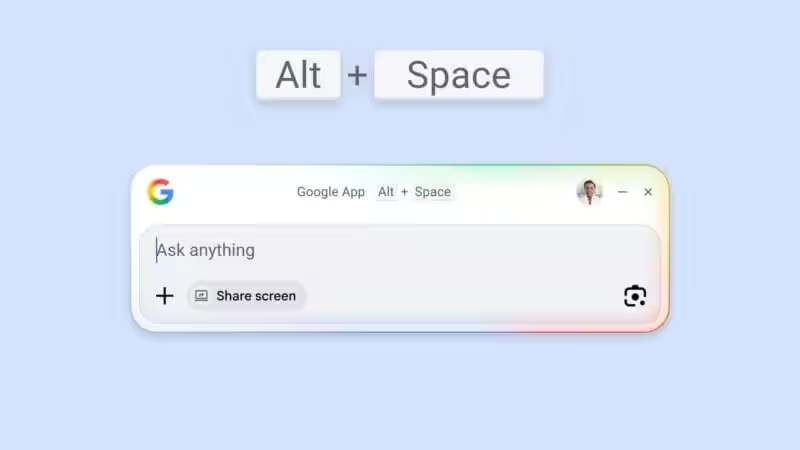
The Google app for Windows is available as a stable release after sitting in beta since September 2025. It opens as a small floating window, can be summoned with Alt + Space, and handles both web searches and local file searches if you grant permission. That puts Google in the same ”quick access” territory Microsoft has been pushing with Copilot, except this one is, well, Google.
What the Google app for Windows can do
The new Windows app includes AI Mode and shows AI Overviews in search results. It also has a Google Lens button for analyzing on-screen content, which is the kind of shortcut that makes Samsung’s Circle to Search feel less like a phone-only trick and more like a habit Google wants everywhere.
- Search the web from a floating window
- Search local files with permission
- Open Gemini directly
- Use Google Lens on what is on your screen
- Access AI Mode and AI Overviews
For now, the app is limited to English, with more languages promised in the coming months. That is a very Google rollout: useful on day one, annoyingly incomplete in the way global software often is.
Google’s desktop strategy on Windows and Mac
Google has also launched a native Gemini app for macOS, with links to Google Drive, Google Photos, and NotebookLM, plus the ability to create images, music, and videos. Users can even share their screen for extra context. Windows, though, is still getting the lighter-weight Google Search app rather than a full Gemini desktop client, which leaves Microsoft Copilot and third-party assistants with a bit of breathing room.
That split is telling. Google seems happy to seed search and lightweight AI access on Windows first, while giving Mac users the richer Gemini treatment. If you own a Galaxy Book, the immediate win is simple: fewer browser detours, faster access, and one more reason Google wants to live on your desktop instead of just in a tab.
What happens next for the Google app on Windows
The obvious question is whether Google will stop at search and Lens, or decide Windows deserves the same full Gemini experience macOS already has. Given how aggressively AI assistants are being baked into PCs, a standalone Gemini app for Windows looks less like a nice-to-have and more like the missing piece.