

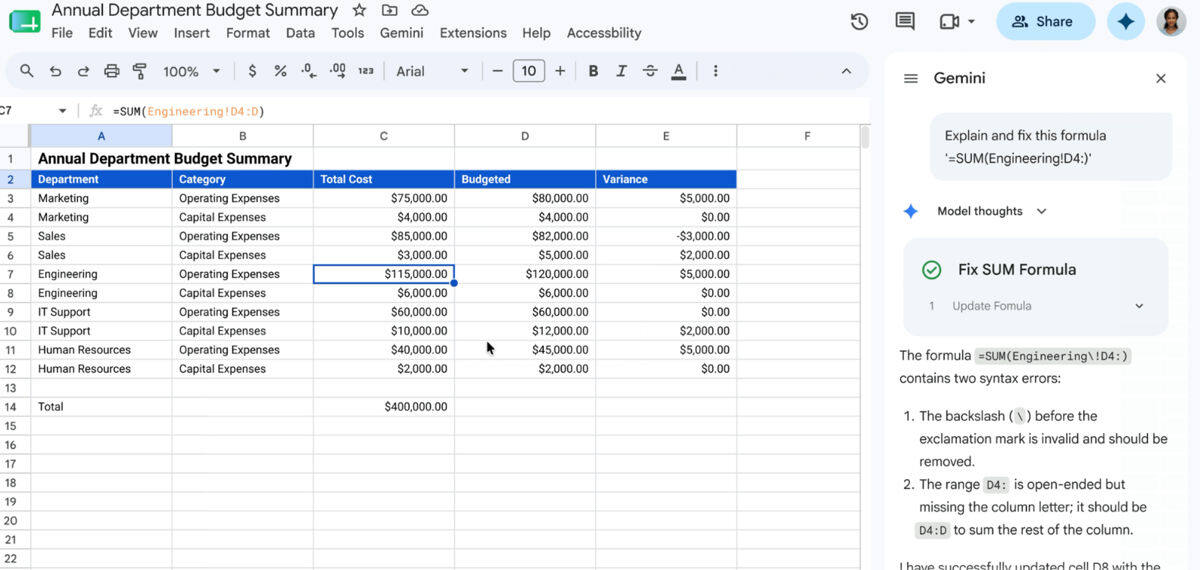
Google is trying to make spreadsheet errors feel less like a scavenger hunt. Its new Gemini feature for Google Sheets can spot a broken formula, explain what went wrong in plain English, and suggest a corrected version without forcing you to leave the cell that failed.
That may sound modest, but it attacks one of Google Sheets’ oldest annoyances: the tiny typo that turns a working formula into a #REF! or #VALUE! mess. Instead of copying the formula into a chatbot and hoping the answer matches your sheet, Gemini looks at the surrounding data and works in place. For people who live in spreadsheets, that is less flashy AI and more actual relief.
How Gemini’s formula fix works in Google Sheets
The feature sits inside the same tab where the error appears. You click the prompt, Gemini diagnoses the issue, explains it, and offers a repaired formula right there. Google says the tool analyzes nearby data, which is the part generic chatbots never quite get right because they cannot see your sheet structure unless you copy everything over.
- Identifies formula errors such as #REF! and #VALUE!
- Explains the problem in plain language
- Suggests a corrected formula inside Google Sheets
- Uses surrounding data to guide the fix
Who gets access to the new Google Sheets tool
Google says the rollout is happening now and continues through July 15. Access is limited to Business Standard, Enterprise, and Google AI Pro and Ultra subscribers, with usage limits easing during that period. That puts the feature squarely in Google’s paid productivity stack, where the company has been steadily stuffing Gemini across Docs, Gmail, and Google Sheets to make Workspace harder to leave.
The timing also makes sense. Spreadsheet software has long had a brutal learning curve for anyone who is not already fluent in formulas, and Microsoft has spent years pushing its own AI helpers into Excel for the same reason. Google’s version is smaller in scope, but arguably more useful because it focuses on the exact moment users get stuck: the error popup.
Why Gemini’s formula repair is smarter than a generic chatbot
The real win here is context. A chatbot can explain what a formula means in theory; Sheets can show what is broken in practice. That difference matters because spreadsheet errors are rarely dramatic. Usually, it is one missing comma, one bad reference, or one badly dragged cell that ruins the whole thing and sends people into copy-paste triage.
Gemini does not erase the need to understand formulas, but it lowers the penalty for getting them wrong. And for a tool that still scares off a lot of casual users, that is probably the most useful AI feature Google could ship next.