

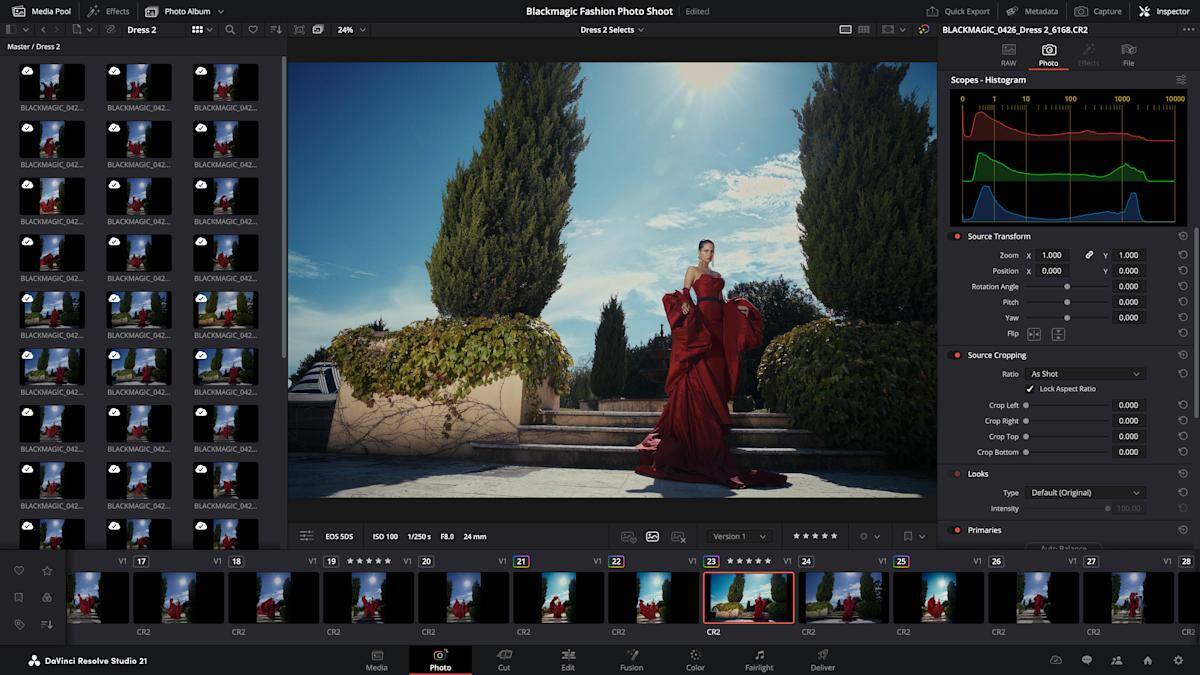
Blackmagic Design is pushing DaVinci Resolve well beyond video editing. In the beta of Resolve 21, unveiled at NAB 2026, the company has added a dedicated Photo page that brings RAW import, album management, and node-based color work into the same app many creators already use for timelines and grading. It is a direct poke at Adobe Lightroom, with a little Photoshop irritation on the side.
The pitch is simple: if Resolve already won over plenty of Premiere users, why stop there? Adobe’s photography apps have long owned the serious end of still-image editing, but Blackmagic is betting that its node workflow, batch-friendly grades, and all-in-one pipeline will tempt photographers who want fewer app switches and more control.
What the DaVinci Resolve Photo page does
The Photo page is not just a renamed video trick. You can import and organize photos, including RAW files, then edit them with the Color page’s familiar toolset: primary color correction, curves, qualifiers, power windows, noise reduction, and sharpening. The key difference is how Resolve handles the work. Its node-based setup lets you stack adjustments in series or parallel, then save those grades for reuse across other images or an entire album.
There is also a useful quality-of-life detail buried in the workflow: you can reframe and crop at the original source resolution and aspect ratio without degrading the file. Blackmagic’s LightBox view applies grades across a whole collection, while albums show up in Color, Cut, and Edit pages for quick access. That kind of cross-page plumbing is exactly the sort of thing Adobe has spent years smoothing out in its own ecosystem.
- RAW photo import and management inside Resolve
- Node-based edits for stacking and reusing looks
- Crop and reframe without changing original image quality
- Live album grading through LightBox
Blackmagic is also borrowing from camera workflows
For photographers working tethered, Resolve now supports live capture from Sony and Canon cameras, with controls for ISO, exposure, and white balance. You can save capture presets too, which is handy if you want to keep a studio set consistent instead of playing whack-a-mole with settings between shots. The Photo page also inherits AI Magic Mask, while Fusion and OpenFX tools extend the app into more complex still-image work.
Collaboration is part of the pitch as well, though Blackmagic Cloud requires a paid subscription. That mirrors a broader industry trend: the software companies that sell ”one app for everything” usually reserve the team features for the paid tier. Adobe does the same dance, just with more legacy baggage and a larger bill.
AI tools now reach stills and faces
Resolve 21 also adds new AI features for video and VFX, including tools aimed at facial retouching. AI Face Age Transformer can analyze a face and push it older or younger using an age offset slider, while AI Face Reshaper adjusts features such as the eyes, nose, mouth, eyebrows, and overall face shape. AI Blemish Removal targets acne, discoloration, and large pores while keeping skin texture intact.
On the restoration side, AI UltraSharpen is meant to rescue footage with soft focus or lift it to higher resolutions, while AI Motion Deblur handles slightly blurred images. Blackmagic also says it has added Fusion editing inside the Cut and Edit pages, the Krokodove compositing library, and new VR delivery tools for platforms including Meta Quest and YouTube VR. Most of these features are available in the free version, but AI Magic Mask and Film Look Creator remain locked to the $295 DaVinci Resolve Studio edition.
A real Lightroom rival, or just another side quest?
On paper, Resolve’s photo tools are more than a curiosity. They combine a serious color pipeline with batch-friendly organization and a familiar export flow, which is a lot more than many video editors can say about their ”photo” features. The missing piece for some users will be the muscle memory built around Lightroom’s Develop tools and Photoshop’s broader editing muscle, but Blackmagic has clearly decided the easiest way to win converts is to make switching feel less like a migration and more like opening another tab.
The bigger question is whether photographers want their editing life to live inside a video-centric suite. If Resolve 21 keeps improving on the basics, the answer may be yes for freelancers and small studios that already straddle stills and motion. The more Adobe leans on subscription lock-in, the more attractive a cheaper, unified alternative starts to look.