


Android’s recovery menu has long been the backstage access for anyone who wants to install a manual update, run diagnostics, or wipe a device without booting the full system. Samsung is quietly narrowing that backstage access, and the change matters beyond a neat UI tweak: it chips away at how developers, repair shops, and power users maintain and fix Galaxy phones.
What changed in the recovery menu
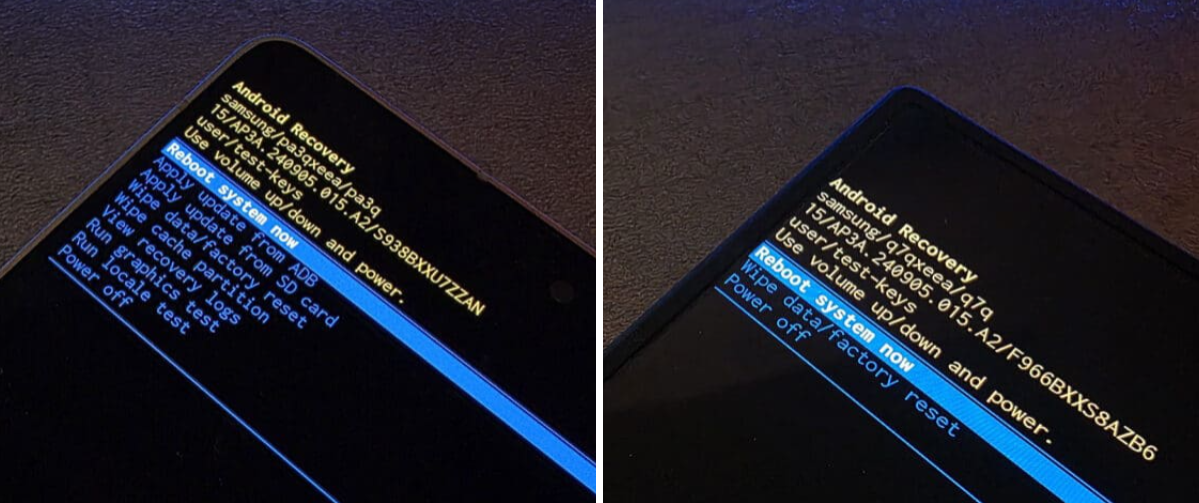
Recent updates to One UI remove several options that have been standard in Android recoveries. The items removed are: Apply update from ADB; Apply update from SD card; Wipe cache partition; View recovery logs; Run graphics test; and Run locale test. The only options left are ”Reboot system now,” ”Wipe data/factory reset,” and ”Power off.”
Community sites first flagged the change, and at least on the January 2026 security-patch build for the Galaxy S26 Ultra, those recovery tools still appear to be present – suggesting the removal is rolling out with the February 2026 updates rather than being in place from launch.
Why this matters
On the face of it, removing ”Apply update from ADB” and ”Apply update from SD card” simply stops users from manually installing over-the-air (OTA) zip files through recovery. That’s how enthusiasts install betas, rollback patches, or apply vendor-supplied updates when an over-the-air rollout stalls. It also blocks a common route for recovery when an OS refuses to boot.
Beyond convenience, there are practical consequences for several groups: people who run custom ROMs and mods; independent repair shops that use reflashing to fix software problems; enterprises that sideload internal updates; and security researchers who need diagnostic logs or the ability to run tests from recovery. Those users now have fewer official tools to work with.
What’s likely behind the decision
Samsung hasn’t published a public rationale tied to the recovery changes. The company has been tightening control over software in other ways – for example, by warning that certain updates will prevent downgrades due to ”security policy” – and by taking steps to limit leaks of One UI builds. Those moves point toward a security-first posture: limiting attack surfaces that could be abused to install unsigned images or run low-level tests.
That argument has merit. Recovery modes are powerful, and in the wrong hands they can be a tool for bypassing protections. But the trade-off is real: security through removal of user-accessible tools tends to push advanced users toward more extreme workarounds like bootloader unlocking, network-based flashing, or tooling that requires handing devices to third parties.
How other vendors handle it
Different manufacturers draw this line in different places. Google’s Pixel lineup has historically retained ”Apply update from ADB” in recovery, which is why Pixel owners can still manually sideload OTAs or install beta builds using the recovery path. At the same time, Samsung already uses Knox and a variety of firmware protections that lock down lower-level access in ways many other Android vendors do not.
Who wins and who loses
Winners: Samsung (fewer leak vectors, simplified support), enterprise customers who want standardized, auditable update paths, and perhaps carriers that prefer tightly controlled software stacks.
Losers: tinkerers, independent repair businesses, ROM developers, and any user who relied on recovery-side sideloading to fix bricked devices or install updates early. The change also risks alienating a vocal portion of the Android community that prizes device control.
What happens next
Expect a few parallel responses. Developers and advanced users will hunt for workarounds or alternate flashing pathways. Repair shops may push for Samsung service channels or paid tooling. Regulators and right-to-repair advocates could take an interest if access restrictions start to block legitimate repairs or business models. And if Samsung follows through with preventing downgrades, those who prefer older firmware builds will have little official recourse.
Samsung may argue this is a trade-off that protects most users. For anyone who needs the power-user tools, the option will increasingly be to keep older builds (when possible), avoid automatic updates that apply the new recovery, or accept more invasive workarounds. None of those are neat solutions.
Bottom line
Removing sideloading and recovery tests is a small-seeming tweak with outsized consequences. It tightens security in ways that make sense from a product control standpoint, but it also narrows the technical options for people who actually maintain, modify, or recover devices. If you value those capabilities, this is the moment to check your device settings and the timing of incoming updates – and to brace for a longer fight over device access.