

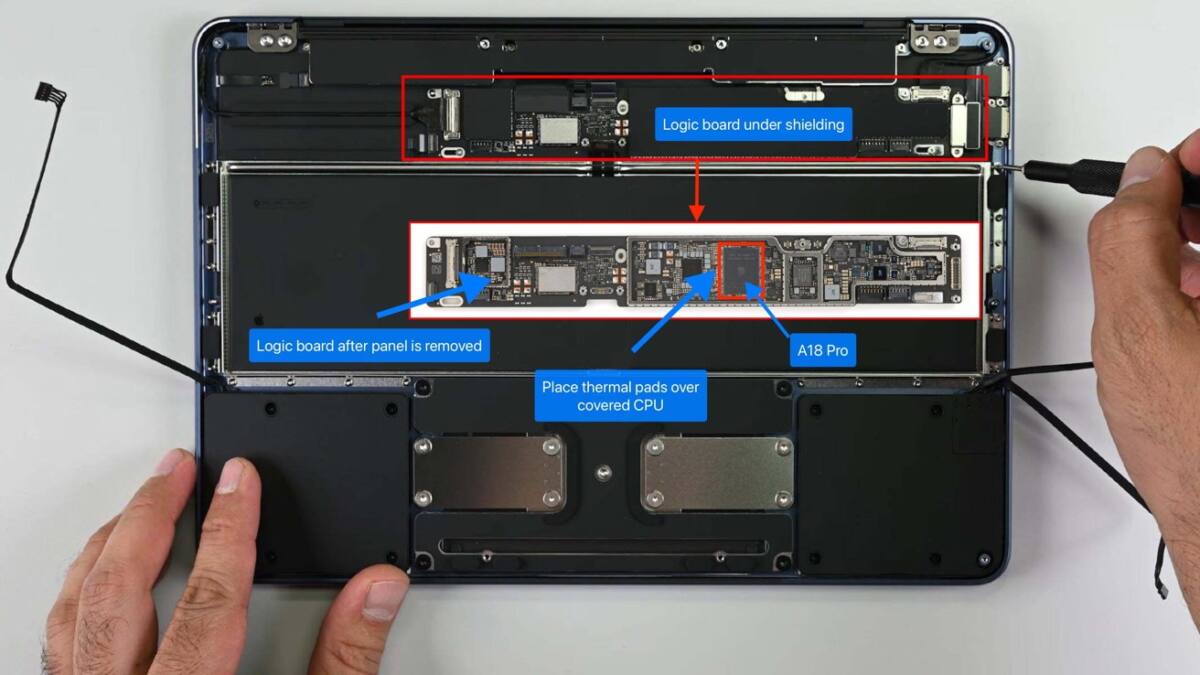
Some MacBook Neo users have discovered that by inserting thermal pads between the processor and the laptop’s aluminum bottom case, they can significantly improve the machine’s sustained performance. This tweak helps the A18 Pro chip maintain clock speeds closer to 3.3 GHz under heavy load, compared to around 2.3 GHz at stock settings, by transferring heat more effectively. But before rushing to pry open your MacBook Neo, there are catches involving warranty risk and increased surface temperatures that make this mod far from ideal for most users.
How the thermal pad mod improves MacBook Neo performance
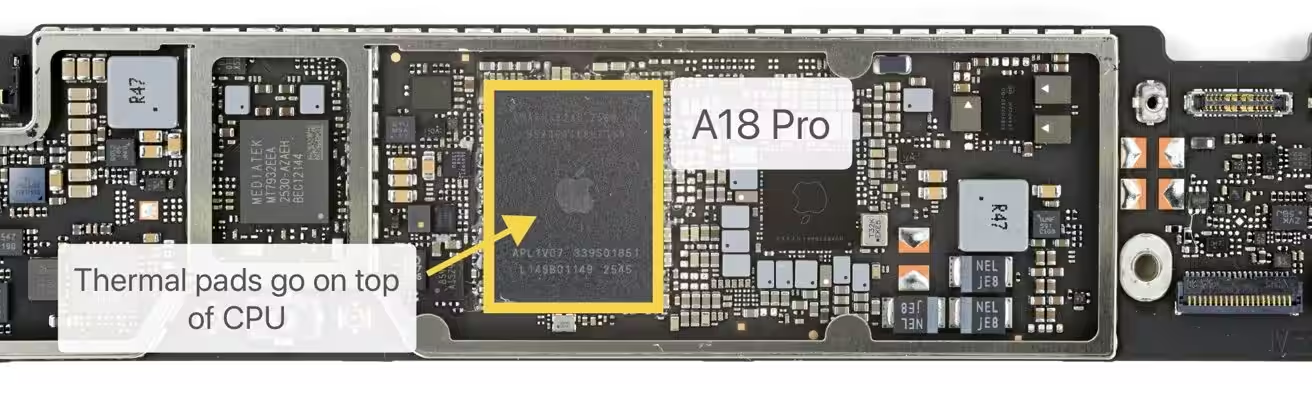
The technique involves removing the MacBook Neo’s bottom panel to access the system-on-a-chip (SoC), which lies beneath a heat spreader. The modder stacks two 1 mm silicone thermal pads atop the processor so they press against the aluminum chassis when reassembled. This shifts heat directly from the chip into the metal case, using it as a giant passive heatsink. As a result, the CPU sustains higher clock speeds longer before triggering thermal throttling, the built-in protective slowdown when temperatures get too high.
Precedents and benefits of thermal pad upgrades on Apple Silicon laptops
The idea isn’t new: enthusiasts have applied similar mods to Intel and Apple Silicon MacBooks for years. Testing on the M2 MacBook Air in 2022 showed that thermal pads boosted sustained Cinebench scores by roughly 8-10%, revealing that better heat dissipation directly improves longer workloads. Since the MacBook Neo is fanless like the MacBook Air, it particularly benefits from enhanced passive cooling, though it also means heat migrates into the laptop’s case.
Drawbacks: increased heat and potential discomfort with the mod
This increase in surface temperature is the main downside. The MacBook Neo’s aluminum shell becomes noticeably warmer under heavy use, potentially creating uncomfortable hot spots if you use it on your lap. Apple’s conservative thermal design trades off raw speed for user comfort and regulatory compliance, keeping exterior temperatures within safe limits and focusing on silent operation. The MacBook Pro’s active cooling system with fans exemplifies this more balanced approach for sustained performance.

Warranty risks and considerations before attempting the thermal mod
Another practical concern: Apple may deny warranty repairs if it finds damage caused by this unauthorized internal modification. Users attempting this mod should remove the thermal pads and restore the device to its factory state before sending it in for service. Considering the potential risks and the warmer case, this kind of enthusiast tweak remains niche-helpful for those prioritizing every bit of sustained performance but less attractive for everyday users who value reliability and comfort.
Choosing the right MacBook for sustained performance and thermal management
Ultimately, the MacBook Neo’s passive cooling design shapes its performance envelope. While clever mods like thermal pad stacking can push temperatures-and performance-a bit further, they’re not risk-free. Apple’s thermal throttling protects the longevity and safety of its devices rather than unlocking peak speed. Those who want consistently higher performance without discomfort should probably opt for actively cooled MacBook models instead.