

Google is giving Gemini a more visual way to explain things: the Gemini chatbot can now generate interactive 3D models and simulations that you can rotate, zoom, pause, and tweak in real time. It is the sort of feature that turns a vague answer into something you can poke at, which is handy if you are trying to understand orbital motion, wave behavior, or any other topic that tends to melt into word salad.
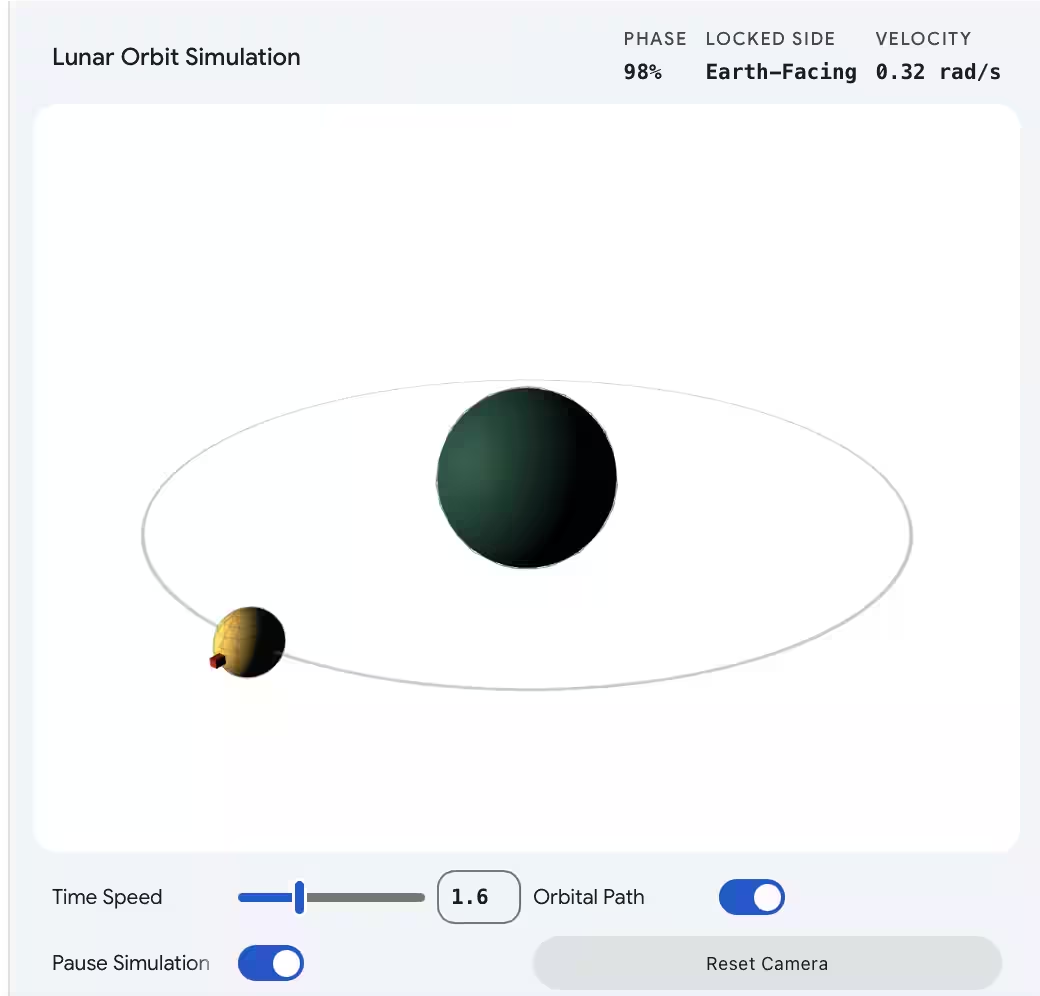
To test it, Gemini was asked to simulate the Moon orbiting the Earth, and it produced a model with controls for orbit speed, a toggle to hide the orbital path, and a pause button. The chatbot also lets users zoom in and rotate the scene, which is the kind of interaction that makes this feel less like a chatbot demo and more like a lightweight teaching tool.
How Gemini’s visualization feature works
All Gemini app users can try it by choosing the Pro model in the prompt bar and asking for a visualization. Google says prompts such as ”show me a double pendulum” or ”help me visualize the Doppler effect” should surface a ”Show me the visualization” button under the response.
Google is catching up with rivals
The timing is no accident. Anthropic recently added charts, diagrams, and other interactive visuals to Claude, while OpenAI has also pushed ChatGPT toward visual explanations for math and science concepts. Gemini’s previous trick was limited to interactive images, so this upgrade is less a moonshot than a competitive correction, but at least Google finally gave the feature some gravity.
The bigger question is whether people will actually use Gemini for learning instead of just admiring the shiny thing. If Google keeps improving these tools, the next step is obvious: more subjects, more control, and fewer answers that sound like they were written by a textbook with a migraine.