

If your TV setup occasionally stutters, pops, or drops channels when the Apple TV 4K talks to a soundbar or AV receiver, you’re not alone. The streaming device, modern surround formats and a mess of HDMI handshakes have been colliding for years – and tvOS 26.4’s new ”Continuous Audio Connection” setting looks like Apple’s attempt to stop the noise without rewriting the industry rulebook.
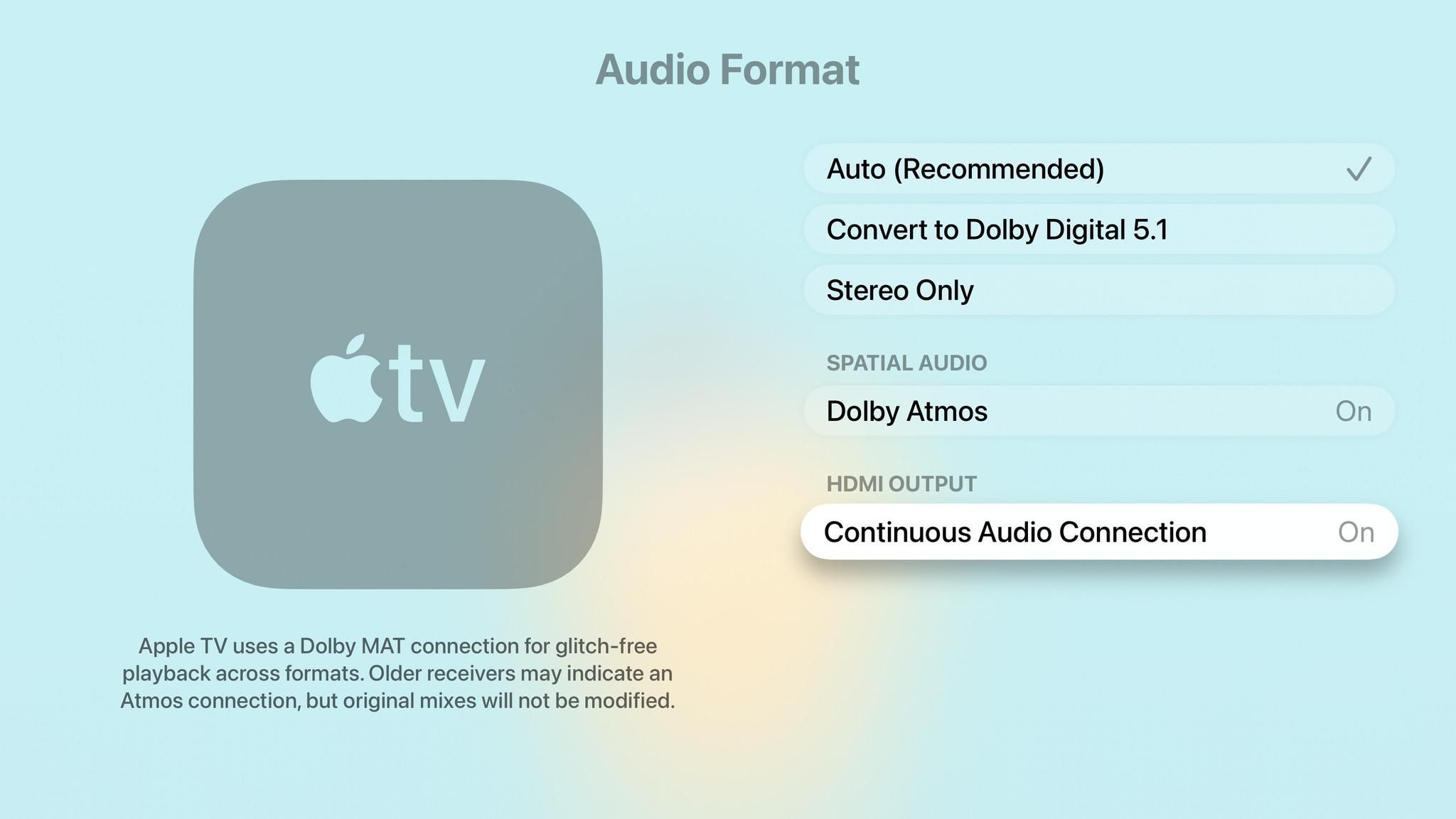
The setting arrived in the tvOS 26.4 developer and public betas and is already being tested by users. Apple’s short description of the option frames it as an under-the-hood compatibility tweak:
Apple TV uses a Dolby MAT connection for glitch-free playback across formats. Older receivers may indicate an Atmos connection, but original mixes will not be modified.
Apple
Put plainly: Apple is trying to keep the audio link steady so receivers and wireless speakers don’t renegotiate formats mid-playback and produce audible pops or drop channels.
Why the problem keeps showing up
Modern streaming devices and sound systems speak many audio ”languages” – LPCM, Dolby Digital, Dolby Atmos carried via Dolby MAT, and so on. When a TV, Apple TV, AV receiver or a wireless speaker like Sonos isn’t perfectly aligned on which format to use, the HDMI connection can re-negotiate. That renegotiation sometimes causes brief dropouts, quieting, or popping noises, especially with multichannel PCM 5.1 streams and wireless surround stacks.
Users running the tvOS 26.4 beta report that enabling ”Continuous Audio Connection” removes the low-volume popping some Sonos owners have seen when the Apple TV outputs 5.1 LPCM through an AV receiver. That’s significant because Sonos hardware frequently sits behind an AV receiver or TV and can be sensitive to format switching.
A practical band‑aid, not a standard fix
This feels like a pragmatic engineering choice rather than a deep compatibility cure. Keeping an audio stream continuously active prevents renegotiation, which reduces pops – but it doesn’t address the root causes: inconsistent handling of HDMI standards, quirks in device firmware, or the fragmented ways vendors implement eARC and Dolby MAT.
Compare how other streaming platforms approach the problem: many Roku and Fire TV devices let you toggle audio passthrough or force Dolby Digital, which sidesteps certain format negotiations at the cost of limiting bit depth or channels. Apple’s approach preserves format fidelity but trades that for a persistent connection that might increase device activity and, in rare cases, confuse receivers that expect dynamic switching.
Who wins, who loses
Winners: users with Sonos systems or AV receivers experiencing audible pops; Apple, because it reduces support headaches and returns; and installers who just want a stable listening experience without chasing firmware updates.
Losers: AV and speaker makers who still need to harden their HDMI implementations; anyone worried about leaving an audio stream constantly active (slightly higher power draw, possible odd interactions); and users with setups that rely on automatic format switching for certain features.
What Apple could have done instead
Longer term, the sensible route is better cross‑vendor testing and firmware fixes from receiver and speaker makers so devices handle format switches gracefully. Apple could also publish more detailed compatibility guidance for Dolby MAT and eARC edge cases, or provide a diagnostic tool in tvOS that shows exactly what format each device believes is active.
For now, the new setting is the low-friction option: easy to roll out in a tvOS update and simple for users to toggle. Expect Apple to ship tvOS 26.4 to the public soon and for Sonos and AV communities to validate whether this actually ends the long-running popping headaches across more hardware combinations.
What to do if you hear pops
If you’re affected and comfortable running betas, try tvOS 26.4 and enable ”Continuous Audio Connection.” If you prefer waiting, hold out for the public release and watch Sonos and AV forums for confirmation. As a fallback, forcing Dolby Digital passthrough in your player or receiver still works in many setups, but at the cost of surround fidelity with newer formats.
Apple’s change is a welcome pragmatic fix. Don’t expect it to solve every HDMI headache – but it might make movie night a lot less irritating for a lot of people.