

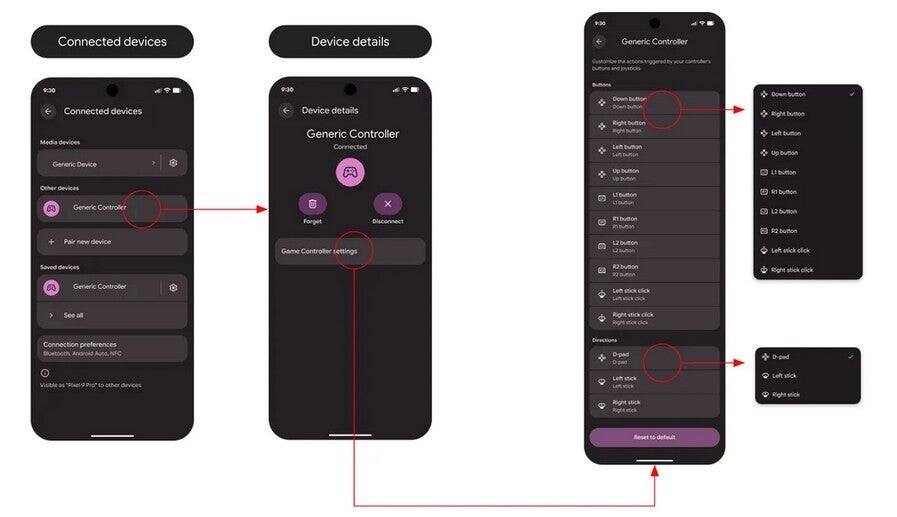
Android 17 is shaping up to be a better home for mobile gaming, and the headline feature is simple: Google is adding system-level controller remapping. For players who already use a gamepad on Android, that means button layouts can finally follow them from one game to the next instead of resetting the moment they switch apps.
The feature is already showing up in Android 17 Beta 2, which is available to people with a Pixel 6 or later, a OnePlus 15, or an Oppo Find X9 Pro. Google has been inching Android toward a more console-like feel for years, and this is the sort of plumbing work that matters more than another shiny animation ever will.
How Android 17 controller remapping works
According to a post from Mishaal Rahman, Android 17 exposes controller settings at the system level rather than burying them inside individual games. That lets users change what happens when they press face buttons, triggers, thumbstick clicks, or directional inputs, then keep those choices in place across different titles.
That sounds basic, which is exactly why people have wanted it for so long. Android already supports a wide range of gamepads out of the box, and the Play Store’s controller-friendly library has been growing alongside it. The missing piece was always consistency, especially for players who juggle multiple devices or switch between touch and controller layouts.
Where to find the Android 17 controller remapping settings
Google is placing the controls in different places depending on how the controller connects. For a wired gamepad, users go to Settings, then System, then Game Controller, and pick the connected device. For a Bluetooth controller, the path runs through Settings, Connected devices, then the menu icon next to the gamepad, followed by Game Controller settings.
Inside that menu, Android separates button inputs from directional inputs. In practice, that means a button can be reassigned to trigger another button action, while directional controls can be mapped to different directional functions. It is not flashy, but it is the kind of feature that quietly saves people from muscle-memory mistakes and awkward button gymnastics.
Why gamers will actually care
The best part here is accessibility. If a particular button is hard to reach or difficult to press, users can move that action to something easier. That helps players with physical needs, but it also helps anyone who has ever swapped controllers and wondered why their hands suddenly feel stupid.
- Works at the system level, so mappings can carry across games
- Supports both wired and Bluetooth controllers
- Lets users remap button inputs and directional inputs separately
Android has long had the hardware support to make this possible; what it lacked was a clean, built-in way to manage it. That is a small concession from Google, but a meaningful one, because mobile gaming has steadily been moving away from tap-and-pray design toward real input support. If this survives the beta stage intact, it will be one of those features people notice most after they have already stopped thinking about it.
The bigger question is whether Google keeps pushing controller support beyond remapping. If Android 17 is willing to give games a better foundation for gamepads, the next obvious step is making setup even less fiddly. For once, the boring settings menu may end up doing the heavy lifting.