

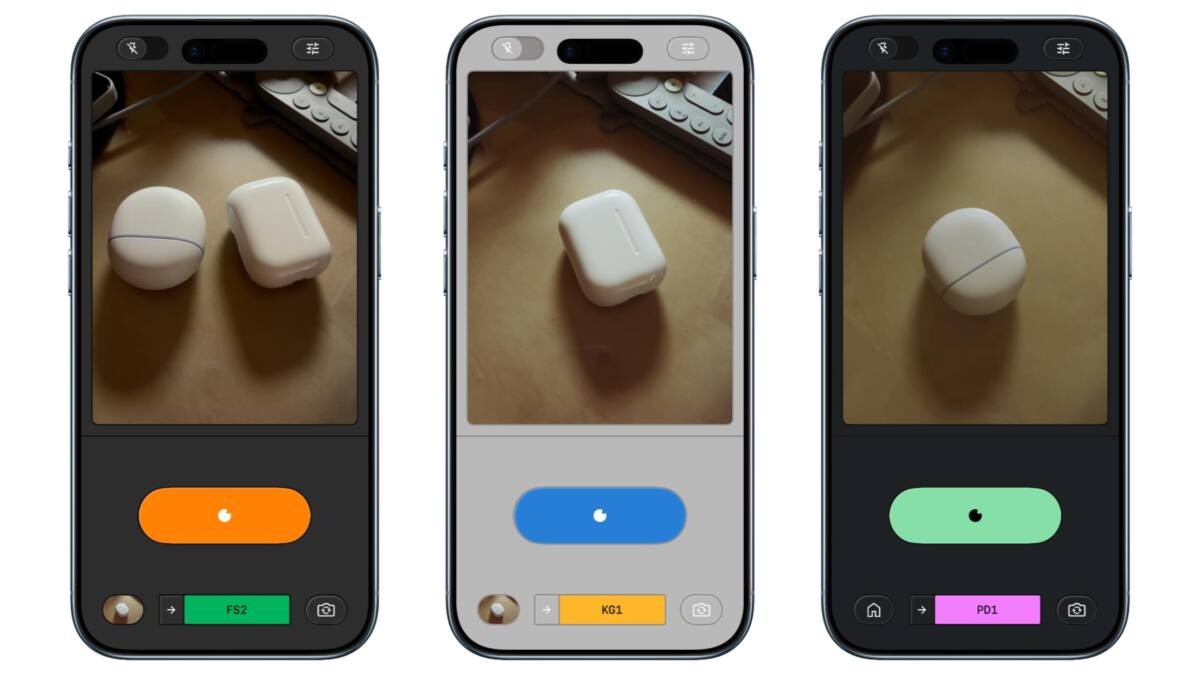
Point-and-shoot photography has lived in two rooms: capture and edit. Snapseed just knocked a hole between them.
Google’s Snapseed for iOS (version 3.15.0) now bundles a full camera inside the editor. That sounds small until you realise it changes how you think about every shot: instead of saving a static JPG and wrestling with edits afterward, you capture with a full, non-destructive editing stack already attached.
Before this change, Snapseed’s camera feature could only be summoned from a Lock Screen widget, Control Center, or Camera Control. There’s now a camera icon in the app’s top-right corner, making the tool obvious and repeatable during normal use.
What’s actually new
Snapseed’s new camera brings two practical things most users will notice fast:
• A ”PRO” toggle in the top-left that gives manual ISO, Shutter Speed, and Focus controls, plus a skeuomorphic dial to switch from Auto.
• Real-time film emulation applied in the viewfinder, with a rewind animation when you switch films. Every photo you take includes an editable stack so you can change looks even after saving.
This means you can change, fine-tune, or revert any part of the look even after the photo is saved to your gallery.
Google
The app also moves interface elements around: flash to the bottom-left, zoom on the opposite side, and a set of color themes for the viewfinder – Editor, Dusk, Negative, Steel, Haze, and Depth.
The film options (real-time)
Snapseed’s film emulations are offered live in the viewfinder and carry through to the saved file’s editing stack. Names are listed exactly as provided:
KP1: Inspired by Kodak Portra 400
KP2: Inspired by Kodak Portra 160
KG1: Inspired by Kodak Gold 200
KE1: Inspired by Kodak E200
FS1: Inspired by Fuji Superia 200
FS2: Inspired by Fuji Superia 800
FP1: Inspired by Fuji Pro 400h
AG1: Inspired by Agfa Optima 200
AS1: Inspired by Agfa Scala 200
PD1: Inspired by Polaroid 600
TC1: Inspired by Technicolor
Why this matters
This move does three things at once. First, it collapses editing and capture into one workflow. For casual users that means fewer steps between the visual idea and the final image; for hobbyists it means more deliberate shooting because the look is baked in but still reversible.
Second, Snapseed is bringing pro controls to a mainstream editor. Manual ISO, shutter speed and focus used to be the preserve of niche camera apps and high-end hardware; now they’re in an app many people already use to finish photos.
Third, the ”editable stack” model lowers the cost of experimentation. Apply a film emulation in-camera, try different shutter speeds, and still roll back the film look later. That non-destructive approach is a subtle but meaningful UX improvement over the typical save-and-edit cycle.
Where this fits in the wider market
This isn’t the first app to combine capture with strong editing. Adobe Lightroom Mobile has long offered RAW capture, built-in profiles and non-destructive edits. Halide and other pro camera apps focus on the capture side with refined controls and RAW workflows, while VSCO made film-style presets fashionable.
Snapseed’s angle is different: it starts from editing credibility and folds a camera into that experience. For users who open Snapseed to polish photos more often than they tap a pro camera app, that’s a sensible consolidation. For dedicated shooters who rely on deep RAW workflows and tethered processing, this is unlikely to replace their toolkit overnight.
What’s missing and what’s next
There are a few gaps. The announcement focuses on iPhone. Google says an Android redesign of Snapseed’s editor is in progress, but there’s no timeline for parity. If Snapseed hopes to be a cross-platform capture-and-edit standard, Android users – many of whom use Google’s camera-heavy Pixel line – will want the same features fast.
Technology-wise, Snapseed is still playing in the pixels-and-presets lane. There’s no mention of deeper RAW pipeline controls, tethered workflows, or multi-frame computational capture aimed at replacing native camera hardware features like Apple’s ProRAW or cinematic modes.
That’s fine. Not every update has to chase pros. What matters is that Google is betting on making edits an integral part of the moment you shoot, not an afterthought. Expect other editing-first apps to follow, and watch pro-camera makers to sharpen their capture-only advantages in response.
The takeaway
Snapseed’s camera is a clever nudge toward a simpler, more creative workflow: pick a look while you shoot, but keep the freedom to change it later. It won’t replace professional tools, but for the vast middle of smartphone shooters it reduces friction – and that’s where most photos are made and shared.
Snapseed 3.15.0 is available on the App Store and is free.