

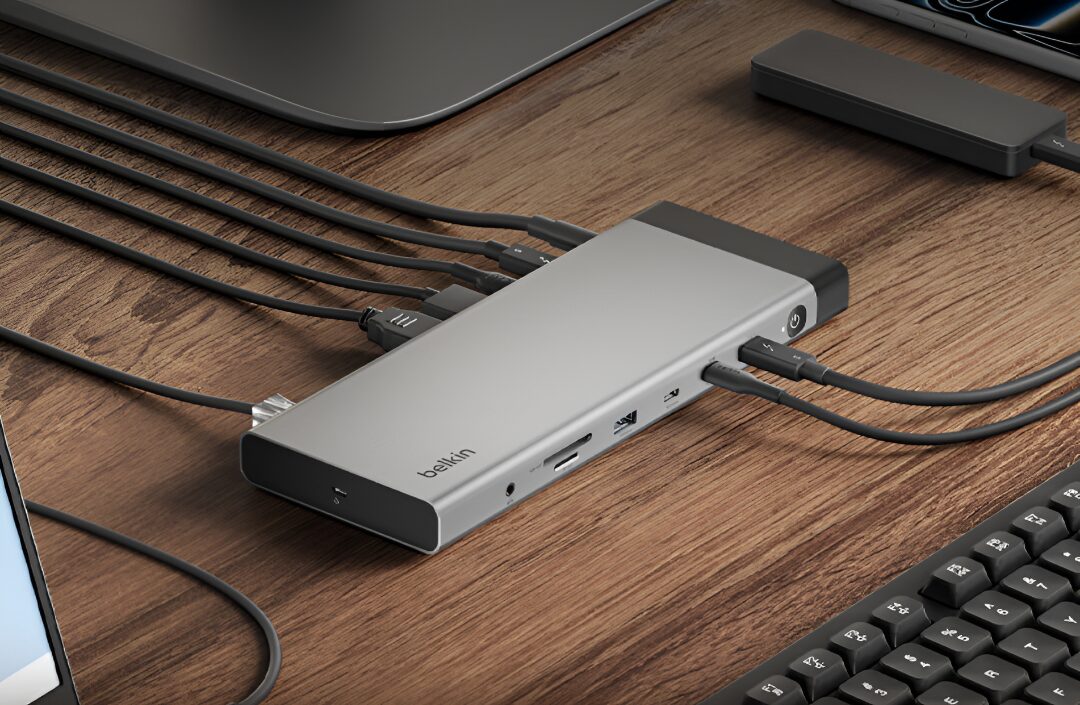
Belkin has put a serious workstation dock on sale in China: a 14-in-1 Thunderbolt 5 dock priced at 2,299 yuan ($338) that pushes 140W power delivery, supports up to three external 4K displays at 144Hz on compatible Windows machines, and looks aimed squarely at people who have turned their desk into a cable management stress test.
The Belkin Thunderbolt 5 dock is straightforward enough. Thunderbolt 5 gives the dock the headroom to handle demanding laptops, fast storage, and high-refresh monitors without immediately collapsing into compromise. That matters because Belkin is entering a space where rivals have been busy leaning on Thunderbolt 4 and USB4; this newer standard is the first real excuse for a dock that can talk up bandwidth, charging, and display support in the same breath.
Thunderbolt 5 bandwidth and 140W charging
The dock connects through a primary Thunderbolt 5 upstream port and ships with a 180W power adapter, plus a one-meter Thunderbolt 5 cable. Belkin says the dock can deliver up to 140W of USB Power Delivery to the host machine, which should cover larger laptops that refuse to stay humble. Standard data transfers run at 80Gbps, but the dock can dynamically shift bandwidth up to 120Gbps when higher-resolution or higher-refresh displays are connected.
- 1x Thunderbolt 5 upstream port
- 2x downstream Thunderbolt 5 ports with 15W charging each
- Up to 140W USB Power Delivery to the host
- 80Gbps standard data transfer, up to 120Gbps for display-heavy use
Display outputs for serious multi-monitor setups
For video, Belkin includes one DisplayPort 2.1 and one HDMI 2.1 output, each rated for up to 8K at 60Hz or 4K at 240Hz on compatible hardware. Video can also be routed through the two downstream Thunderbolt 5 ports, which makes the dock more flexible than the usual ”one port, one hope” setup many office accessories settle for.
On Windows, the Thunderbolt 5 dock can drive three external 4K displays at 144Hz, or four independent screens in total. Mac support is more constrained, because Apple still makes display support depend on the processor rather than the dock itself: newer M4 and M5 systems can handle multiple external displays, while M1, M2, and M3 machines are limited by hardware.
Ports, size and legacy support
The aluminum chassis weighs 510g and measures 22.2 by 8.5 by 2 cm. Around the sides are two USB-C 3.2 ports, one with 30W charging and another with 7.5W output, plus one 10Gbps USB-A 3.2 port, two 5Gbps USB-A 3.0 ports, 2.5 Gigabit Ethernet, a 3.5mm audio jack, and UHS-II SD 4.0 and microSD 4.0 readers rated at 312MB/s.
Belkin also added a physical power button, LED status light, Kensington lock slot, and a distributed thermal management system for longer sessions. The dock works with Thunderbolt 4, USB4, and standard USB-C devices, although bandwidth and display support will drop accordingly. Thunderbolt 3 laptops and displays are not supported, which is the sort of small-print annoyance that can still ruin a well-funded desk upgrade.
Belkin has been moving quickly across the accessories stack lately, with a magnetic 10K power bank and a 45W GaN charger also joining the lineup. The dock is the more ambitious play, though, because it targets the users who actually notice whether a port is 80Gbps, 120Gbps, or just pretending.