

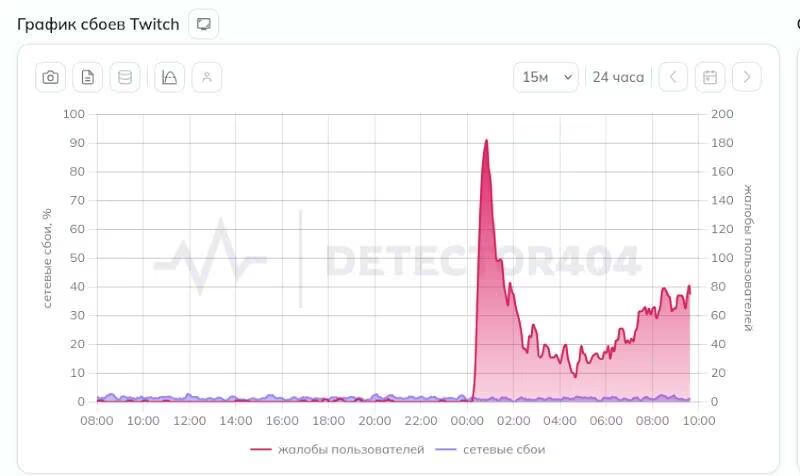
On June 23, a large number of Twitch users in Russia encountered video streams failing to load, seeing error #2000, despite Twitch’s website, chat, and channel pages functioning normally. Official sources confirm Twitch’s platform itself is operating normally, pointing to issues within Russian internet networks as the root cause.
Twitch’s status page reports all services-video playback, streaming, and chat-as operational with no internal outages. ([status.twitch.com](https://status.twitch.com/?utm_source=openai))
Users from regions including St. Petersburg, Nizhny Novgorod, Moscow, Kaliningrad, and Novosibirsk have flooded online outage trackers with complaints about streams not loading. ([stream-promotion.ru](https://stream-promotion.ru/en/kak-vernut-vysokoe-kachestvo-v-twitch-vse-sposoby-smotret-strimy-v-1080p-v-rossii?utm_source=openai))
Twitch limits stream quality to 720p in Russia
Recently, Twitch enforced a forced cap on maximum stream quality for viewers in Russia, restricting playback to 720p at 60 FPS for users without VPN. Full HD streams remain accessible only when streaming through VPNs or foreign IP addresses. ([stream-promotion.ru](https://stream-promotion.ru/en/kak-vernut-vysokoe-kachestvo-v-twitch-vse-sposoby-smotret-strimy-v-1080p-v-rossii?utm_source=openai), [kod.ru](https://kod.ru/twitch-low-quality?utm_source=openai))
Roskomnadzor confirms no official Twitch block in Russia
The Russian telecom regulator Roskomnadzor has repeatedly stated that without a formal court ruling, Twitch is not officially blocked in Russia. Their most recent statement dates to December 2023. ([bfm.ru](https://www.bfm.ru/news/593768?utm_source=openai)) Public reports corroborate that Twitch remains available, albeit with quality and technical restrictions. ([android-igry.ru](https://android-igry.ru/articles/kak-smotret-twitch-v-rossii-v-2026-godu?utm_source=openai))
Troubleshooting Twitch error #2000 in Russia
If you encounter Twitch error #2000 and streams won’t load, try the following troubleshooting steps:
- Change your IP address or use a VPN-altering your data route often helps. ([privateproxyguide.com](https://www.privateproxyguide.com/twitch-not-working-with-vpn/?utm_source=openai))
- Clear your browser cache and disable ad blockers or extensions that might interfere with video loading. ([howtogeek.com](https://www.howtogeek.com/894509/how-to-fix-a-twitch-error-2000/?utm_source=openai))
- Lower stream quality to 720p to reduce buffering if streams partially load but frequently cut out. ([stream-promotion.ru](https://stream-promotion.ru/en/kak-vernut-vysokoe-kachestvo-v-twitch-vse-sposoby-smotret-strimy-v-1080p-v-rossii?utm_source=openai))
- Streamers can broadcast at resolutions above 1080p (e.g., 1440p) so Russian viewers can receive the highest allowed stream quality. ([stream-promotion.ru](https://stream-promotion.ru/en/kak-vernut-vysokoe-kachestvo-v-twitch-vse-sposoby-smotret-strimy-v-1080p-v-rossii?utm_source=openai))
- Test streams through third-party clients like Streamlink combined with mpv media player. ([android-igry.ru](https://android-igry.ru/articles/kak-smotret-twitch-v-rossii-v-2026-godu?utm_source=openai))
These workarounds might ease the impact of current restrictions, but the underlying issues remain outside regular users’ control.
Current Twitch access and potential future restrictions in Russia
There’s no official court order or addition of Twitch to Russia’s banned websites registry at this time. ([bfm.ru](https://www.bfm.ru/news/593768?utm_source=openai)) Still, the trajectory-initial network glitches, then degraded features, followed by a potential full shutdown-echoes past crackdowns on YouTube and other services.
The situation warrants close attention as ongoing network disruptions threaten Twitch’s accessibility in Russia. Whether these are temporary glitches or a prelude to stricter censorship remains an open question for viewers and streamers alike.