

Google has brought Gemini to macOS as a standalone app, giving Mac users a quicker way to summon the Gemini AI assistant with Option + Space and interact with it in a floating panel over other windows. The app mirrors the web version closely, but the bigger hook is simple: Google now has a native presence on Apple’s desktop, not just a browser tab.
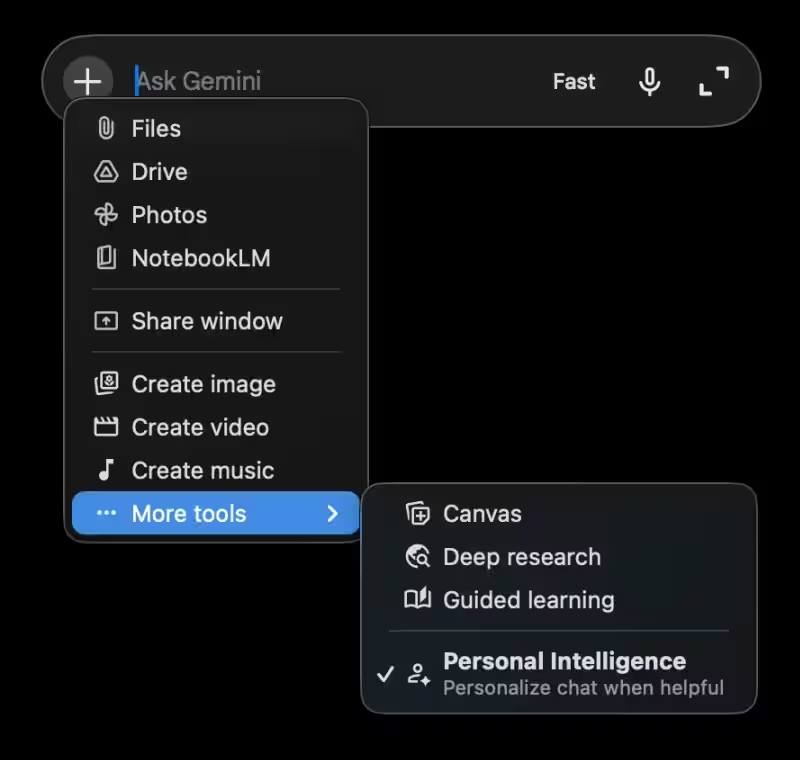
The interface leans hard into Apple’s current design mood, with a long Liquid Glass-style bar and a plus button that opens file upload options, Google Drive documents, photos, and screen sharing. Google is also putting image, video, and audio generation, as well as deep research, inside the same launcher, which is tidy for users and a little self-congratulatory for the product team. The app syncs with the user’s Google account, so the desktop version is not a toy wrapper; it’s tied into the same personal data fabric as the web service.
What Gemini can do on macOS
- Open Gemini over other apps with Option + Space
- Upload files, Google Drive documents, and photos from the ”+” menu
- Share a window with Gemini for screen-based help
- Access image, video, audio generation, and deep research tools
- Switch AI models and use voice input from the right side of the panel
The Mac launch also shows Google chasing the same desktop habit that has made ChatGPT and other assistants sticky: live where the work happens, not where a browser tab happens to be open. That matters because Apple users have plenty of built-in software choices, and an AI app has to feel useful fast or it gets buried under Dock icons and good intentions.
Gemini on Mac requires macOS 15
Google says Gemini for macOS is available on Macs running macOS 15 and later. It also includes an option to share ”everything on your screen,” including local files, which is the kind of feature that will attract power users and make security teams sit up a little straighter.
The open question is whether Google will keep the app feeling native, or whether it will drift into the usual cross-platform compromise: technically present, practically forgettable. On Mac, that is a fast route to the trash can.